NSX Troubleshooting Scenario 9

Welcome to the ninth installment of my NSX troubleshooting series. What I hope to do in these posts is share some of the common issues I run across from day to day. Each scenario will be a two-part post. The first will be an outline of the symptoms and problem statement along with bits of information from the environment. The second will be the solution, including the troubleshooting and investigation I did to get there.

The Scenario

As always, we’ll start with a brief problem statement:

“We’re in the process of deploying NSX. We were able to deploy the NSX Manager and Control Cluster, but every time we try to install the VIBs on the host, it fails with a licensing error. We have already added the license for NSX Enterprise in vCenter!”

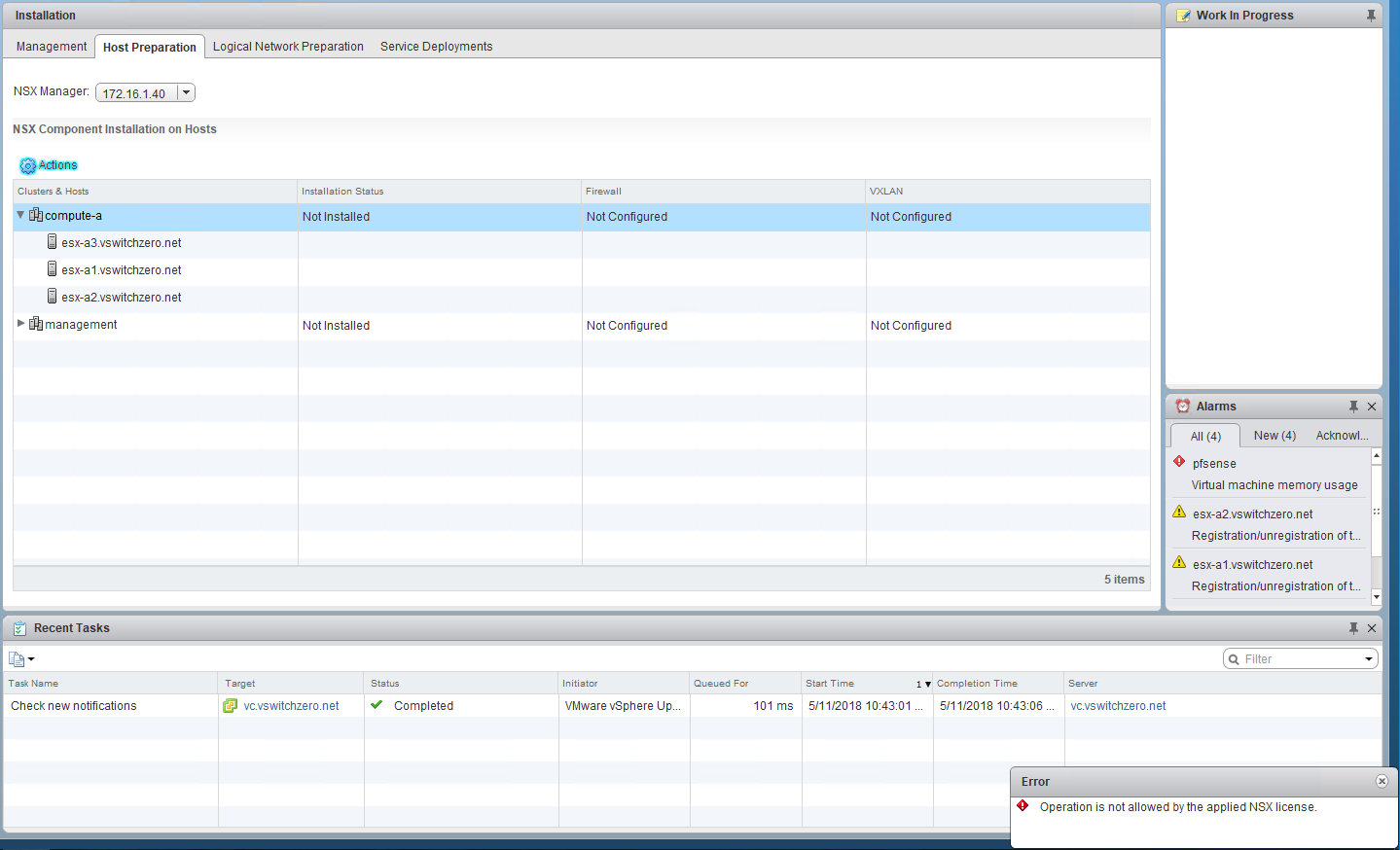
Every time the customer tries to prepare cluster compute-a, they get the following error:

tshoot9a-1

The exact error is:

“Operation is not allowed by the applied NSX license.”

Looking in the most obvious spot, we can see that the customer had indeed added a license for ‘NSX for vSphere – Enterprise’. Not only that, but there is also an ‘NSX for vShield Endpoint’ license.

Continue reading “NSX Troubleshooting Scenario 9”

5.25″ Floppy Drive Alignment

About a year ago, I bought a dusty old Panasonic WU-475 1.2MB 5.25” floppy drive from someone on Kijiji. It was being sold as-is, but for the price I decided to give it a go. To my surprise, it seemed to work initially, but within a few minutes it began to emit a horrid clanging and grinding noise. After opening the drive up, it was clear that the stepper motor had completely ceased up.

After applying some lubricant to the rail and cleaning the drive out, the motor was again functional. Thinking it would be good to go, I installed it and tested it out again. Excitement quickly turned to disappointment, however, when I discovered that the drive could no longer read any of my 5.25” floppies. After troubleshooting for a while, I discovered that if I formatted a disk using the drive, it could be read/written just fine. It was only diskettes from other sources that wouldn’t work. This behavior seemed to indicate that the drive somehow went out of alignment during my disassembly and cleaning.

I didn’t know much about floppy alignment aside from the fact that some specialized equipment that I didn’t have would be needed to correct the problem. Generally an oscilloscope is used to take readings during sector reads and then fine adjustments are made until the waveform looks correct. This was the suggested method I discovered in the Panasonic service guide for the WU-475.

Discouraged, I had shelved the drive and let it sit for the better part of a year. Fast forward to May 5th – the 26th anniversary of the classic PC game Wolfenstein 3D. It was time to do something retro. I really wanted to get this drive working again, so I did some more research on the subject. That’s when I came across an old thread at the Vintage Computer Forum. A commenter named Rick discussed a great piece of software called ImageDisk by Dave Dunfield. Because I had some brand new 1.2MB IBM formatted diskettes that had never been used or formatted by another drive, I could use these as a reference point and make the necessary adjustments. At any rate, it was certainly worth a try!


Every drive is different, but the WU-475 has a pair of screws that hold the stepper motor in position. The screw openings are not perfect circles and allow the mechanism to be slid back and forth a millimeter or so in each direction.


Firing up ImageDisk and running the alignment test, I was initially greeted by lots of question marks scrolling down the screen indicating that each sector could not be read. As I loosened the screws and slid the mechanism forward slowly, the PC speaker sprung to life and began to beep indicating successful reads. Once I had it in the position that seemed to yield the best results, I scrolled through all 80 tracks to ensure they could all be read. I then tightened the screws well and lo and behold, the drive works wonderfully again! I’m sure my alignment isn’t perfect, but for all intents and purposes, the drive works.

It’s always a great feeling when you can restore something old and forgotten. As always, do this at your own risk. Making adjustments like this on a live system is inherently risky, so be careful!

Memory Usage Alarm with PCI Passthrough VMs

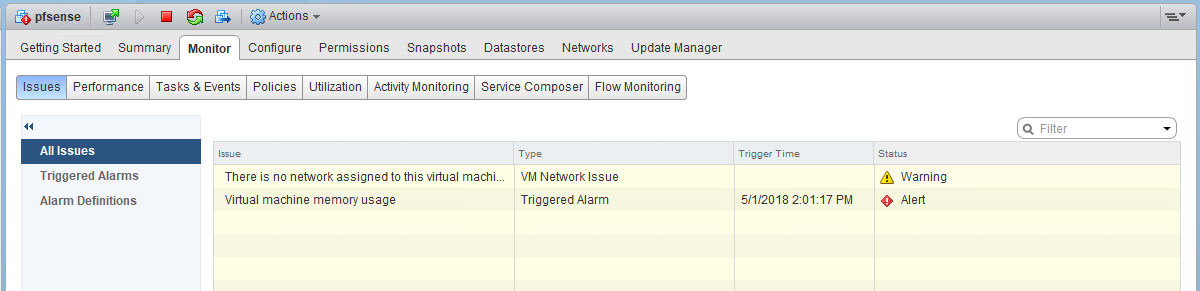
In the recent revamp of my lab environment, I decided to use VT-d passthrough for a pfsense VM. It has been working well with the integrated Intel igb based NICs on my management host, but I noticed that I started getting memory alarms on the VM.

vtd-mem-0

At first, I thought I may have sized the VM a bit too small with only 512MB of RAM, but when checking in the guest itself, I saw only a small amount was actually being used:

vtd-mem-2

At only 19% utilized, I’m nowhere near the 95% required to trigger this alarm. As you can see in the performance charts, all of the memory is being used by the guest from the perspective of ESXi:

vtd-mem-1

But after thinking about this for a moment, it makes sense – one of the requirements for PCI passthrough is to reserve all guest memory. For passthrough to function, the hypervisor must provide 100% consistent and reliable memory to the guest. What better way to ensure that then to reserve and pin all memory to the VM.

Although I understand why all memory is active and consumed, it’s unfortunate that vCenter doesn’t take into consideration the reason for this. In my search for an answer, I came across VMware KB 2149787. It appears that this can impact not only VMs with passthrough, but also fault tolerant VMs and VMs with latency sensitivity set to ‘high’. Unfortunately, the resolution suggested is to disable to virtual machine memory alarm at the vCenter object level. This effectively disables the alarm for everything in the inventory. I hope that at some point, vSphere will allow disabling specific alarms on a per-VM basis because few people would want to take this approach.

For now, I think the best course of action is to simply click ‘Reset to Green’, which should clear the alarm until the VM is powered off/on again. Just keep in mind that this is normal for this type of VM and that the alarm can be disregarded.

NSX Troubleshooting Scenario 8 – Solution

Welcome to the eighth installment of a new series of NSX troubleshooting scenarios. Thanks to everyone who took the time to comment on the first half of scenario eight. Today I’ll be performing some troubleshooting and will show how I came to the solution.

Please see the first half for more detail on the problem symptoms and some scoping.

Getting Started

In the first half of scenario 8, we saw that our fictional administrator was getting an error message while trying to deploy the first of three controller nodes.

The exact error was:

“Waiting for NSX controller ready controller-1 failed in deployment – Timeout on waiting for controller ready.”

Unfortunately, this doesn’t tell us a whole lot aside from the fact that the manager was waiting and eventually gave up.

tshoot8a-7

Now, before we begin troubleshooting, we should first think about the normal process for controller deployment. What exactly happens behind the scenes?

  1. The necessary inputs are provided via the vSphere Client or REST API (i.e. deployment information like datastore, IP Pool etc).
  2. NSX Manager then deploys a controller OVF template that is stored on it’s local filesystem. It does this using vSphere API calls via its inventory tie-in with vCenter Server.
  3. Once the OVF template is deployed, it will be powered on.
  4. During initial power on, the machine will receive an IP address, either via DHCP or via the pool assignment.
  5. Once the controller node has booted, NSX Manager will begin to push the necessary configuration information to it via REST API calls.
  6. Once the controller node is up, and is able to serve requests and communicate with NSX Manager, the deployment is considered successful and the status in the UI changes from ‘Deploying’ to ‘Connected’

Let’s have a look at the NSX Manager logging to see if we can get more information:

Continue reading “NSX Troubleshooting Scenario 8 – Solution”

NSX Troubleshooting Scenario 8

Welcome to the eighth installment of my NSX troubleshooting series. What I hope to do in these posts is share some of the common issues I run across from day to day. Each scenario will be a two-part post. The first will be an outline of the symptoms and problem statement along with bits of information from the environment. The second will be the solution, including the troubleshooting and investigation I did to get there.

The Scenario

As always, we’ll start with a brief problem statement:

“I’m doing a new greenfield deployment of NSX and my control cluster is failing to deploy. It seems stuck at ‘Deploying’ and then after a long period of time, it gives me a failure and the appliance gets deleted.”

Let’s have a look and see what this fictional administrator is seeing:

tshoot8a-2

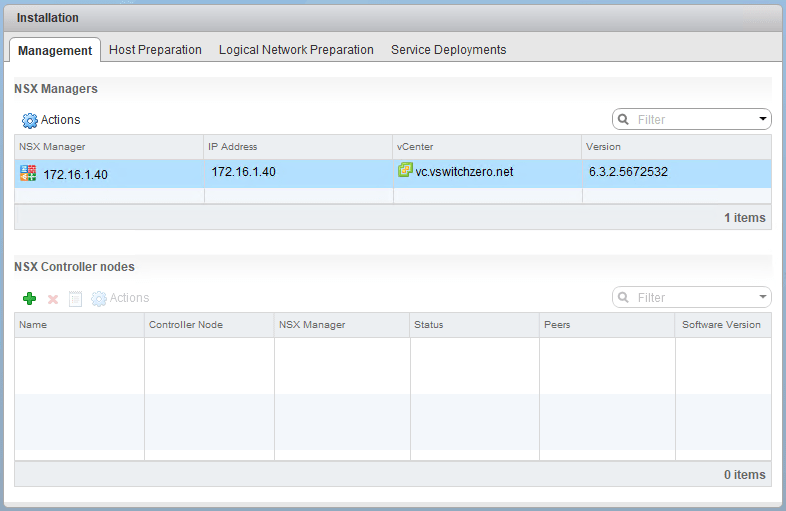
We can see that they’ve successfully deployed NSX Manager at version 6.3.2 and have no controllers successfully deployed yet.

tshoot8a-3

A valid looking IP pool has been created for the controllers with all the pertinent IP settings populated. The controller deployment is being done with the following settings:

Continue reading “NSX Troubleshooting Scenario 8”

Creating a Python Replacement for the Test-Connection cmdlet.

I’ve been working on a PowerShell script to automatically power up and shut down all devices in my home lab. Both in the interest of saving on hydro and to reduce it’s environmental impact. To do this, I’ve been using a low-power Raspberry Pi 3 B+, which will stay powered on to orchestrate these and other scripted activities.

One great PowerShell cmdlet that comes in handy is Test-Connection. Although it can be used for numerous network testing purposes, it’s most commonly used to send an ICMP echo request to a host to see if it responds or not. The cmdlet responds with a simple true or false response, which makes it very handy for scripting purposes. I was really hoping to use this cmdlet because it makes it easy to determine if a device is still online or not and if it’s okay to move on to the next phase of powering things on or shutting things down. For example, I don’t want to power on my management ESXi host until the freenas SAN is online.

The problem I ran into was that not all PowerShell cmdlets have been ported over to PowerShell Core for Linux. Test-Connection is unfortunately one of them due to the way it uses the Microsoft Windows network stack to function. Looking at the GitHub PR, it seems they are getting close to porting it over, but I decided to try my hand at creating a python script with similar basic functionality.

I should note that I’m not a programmer by any stretch of the imagination and it’s been many years since I’ve done any serious coding. This is actually the first bit of python code I’ve written, so I’m sure there are many more efficient ways to achieve what I’ve done here:

import os
import sys

# If no arguments parsed, display the greeting:
if len(sys.argv) == 1:
    print("vswitchzero.com ICMP response script. Specify up to 3 hosts to ping separated by spaces.")
    print("example: python ./pinghost.py 172.16.10.15 192.168.1.1 vc.lab.local")

# If one arg parsed, ping a single host
if len(sys.argv) == 2:
    host1 = sys.argv[1]
    response = os.system("ping -c 1 " + host1 + "> /dev/null")
    if response == 0:
        print host1, 'is responding'
    else:
        print host1, 'is not responding'

# If two args parsed, ping two hosts
if len(sys.argv) == 3:
    host1 = sys.argv[1]
    host2 = sys.argv[2]
    response1 = os.system("ping -c 1 " + host1 + "> /dev/null")
    if response1 == 0:
        print host1, 'is responding'
    else:
        print host1, 'is not responding'
    response2 = os.system("ping -c 1 " + host2 + "> /dev/null")
    if response2 == 0:
        print host2, 'is responding'
    else:
        print host2, 'is not responding'

# If three args parsed, ping three hosts
if len(sys.argv) == 4:
    host1 = sys.argv[1]
    host2 = sys.argv[2]
    host3 = sys.argv[3]
    response1 = os.system("ping -c 1 " + host1 + "> /dev/null")
    if response1 == 0:
        print host1, 'is responding'
    else:
        print host1, 'is not responding'
    response2 = os.system("ping -c 1 " + host2 + "> /dev/null")
    if response2 == 0:
        print host2, 'is responding'
    else:
        print host2, 'is not responding'
 response3 = os.system("ping -c 1 " + host3 + "> /dev/null")
    if response3 == 0:
        print host3, 'is responding'
    else:
        print host3, 'is not responding'

# If more than three args parsed, display an error
if len(sys.argv) > 4:
    print('vswitchzero.com ICMP response script. Specify up to 3 hosts to ping separated by spaces.')
    print('example: python ./pinghost.py 172.16.10.15 192.168.1.1 vc.lab.local')
    print(' ')
    print('ERROR: Too many arguments specified. Use 1-3 IPs or hostnames only. Each should be separated by a space')

Continue reading “Creating a Python Replacement for the Test-Connection cmdlet.”

Dell BMC Problems with FreeNAS/FreeBSD

I’ve recently been working on a scripting project to orchestrate the power up and power down of my entire lab environment. As part of this, I’ve been using IPMI commands to power on physical servers in the correct order and at the correct time.

As I discussed in my recent FreeNAS Build Series, I’ve been using a Dell T110 tower server for storage purposes in my lab. Being an entry level server, the T110 has a very trimmed down iDRAC BMC (Baseboard Management Controller) that doesn’t have a dedicated NIC or a web based management page. Despite it’s limitations, I can still use the IPMI protocol to gather information and to run simple tasks, like powering it on and off.

pi@raspberrypi:~ $ ipmitool -I lanplus -H 172.16.10.67 -U root -P "vmware" lan print 1
Set in Progress : Set Complete
Auth Type Support : NONE MD2 MD5 PASSWORD 
Auth Type Enable : Callback : MD2 MD5 
 : User : MD2 MD5 
 : Operator : MD2 MD5 
 : Admin : MD2 MD5 
 : OEM : 
IP Address Source : Static Address
IP Address : 172.16.10.67
Subnet Mask : 255.255.255.0
MAC Address : b8:ac:6f:92:0b:e9
SNMP Community String : public
IP Header : TTL=0x40 Flags=0x40 Precedence=0x00 TOS=0x10
Default Gateway IP : 172.16.10.1
Default Gateway MAC : 00:00:00:00:00:00
Backup Gateway IP : 0.0.0.0
Backup Gateway MAC : 00:00:00:00:00:00
802.1q VLAN ID : Disabled
802.1q VLAN Priority : 0

Above you can see a simple IPMI query using the ipmitool application available for Linux and other operating systems. In this example, I’m pulling the network configuration of the BMC.

I hadn’t had a need to use IPMI with the Dell T110 until recently, but was surprised to see that the BMC was not responding to ping. Thinking the BMC was just hung up, I did a cold power cycle and double checked the configuration. After several frustrating reboots, it became clear to me that FreeNAS/FreeBSD was not playing nicely with the Dell BMC. It appeared that it would work just fine until the FreeBSD kernel used by FreeNAS started loading. As soon as the bge driver claimed the BCM5722 card, the BMC couldn’t be accessed over the network.

To make things even more frustrating, it would not recover when the machine was shut down or rebooted. I could only get the BMC on the network again after doing a cold power-cycle of the server, or after going into the BMC configuration, changing something, and rebooting.

After doing some digging, I came across a thread on the FreeBSD forum that described my symptoms exactly. I’m not the only one who has run into this issue with Dell BMCs and shared Broadcom adapters in FreeBSD. This thread then led me to FreeBSD bug 196944 regarding a regression in the Broadcom bge driver. It looks like this has actually been broken for some time – all the way back to FreeBSD 9.2 – and is still a problem in 11.1 as well.

A few people were able to work around this issue by recompiling the kernel with the Broadcom driver from back in FreeBSD 9.1. I really didn’t feel comfortable doing this level of tinkering with FreeNAS – especially since any subsequent FreeNAS patches would likely just break it again.

Thankfully, someone in comment 6 of the bug describes a potential workaround that involves nothing more than enabling the PXE bootrom of the onboard Broadcom adapter in the BIOS. This was reported as having mixed results on varying models of Dell servers, but I was willing to give it a try. After changing my onboard NIC from ‘Enabled’ to ‘Enabled with PXE’ in the BIOS, the problem disappeared!

If you have this problem – give it a shot. It’s a simple workaround and the only down side is the extra 2-3 seconds at boot up.

NSX Troubleshooting Scenario 7 – Solution

Welcome to the seventh installment of a new series of NSX troubleshooting scenarios. Thanks to everyone who took the time to comment on the first half of scenario seven. Today I’ll be performing some troubleshooting and will show how I came to the solution.

Please see the first half for more detail on the problem symptoms and some scoping.

Getting Started

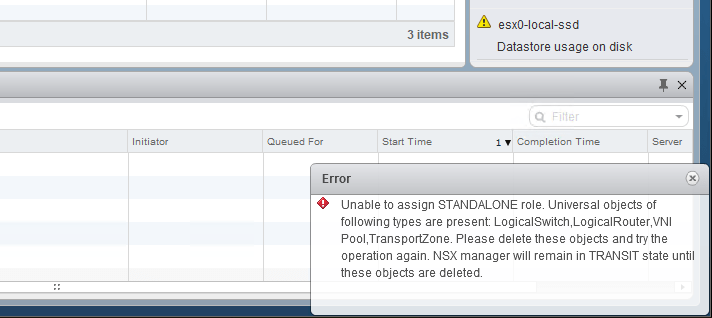
In the first half of this scenario, we saw that our fictional customer was hitting an exception every time they tried to convert their secondary – now a transit – NSX Manager to the standalone role. The error message seemed to imply that numerous universal objects were still in the environment.

tshoot7a-2

Our quick spot checks didn’t show any lingering universal objects, but looking at the NSX Manager logging can tell us a bit more about what still exists:

2018-03-26 22:27:21.779 GMT  INFO http-nio-127.0.0.1-7441-exec-1 ReplicationConfigurationServiceImpl:152 - - [nsxv@6876 comp="nsx-manager" subcomp="manager"] Role validation successful
2018-03-26 22:27:21.792 GMT  INFO http-nio-127.0.0.1-7441-exec-1 DefaultUniversalSyncListener:61 - - [nsxv@6876 comp="nsx-manager" subcomp="manager"] 1 universal objects exists for type VdnScope
2018-03-26 22:27:21.793 GMT  INFO http-nio-127.0.0.1-7441-exec-1 DefaultUniversalSyncListener:66 - - [nsxv@6876 comp="nsx-manager" subcomp="manager"] Some objects are (printing maximum 5 names): Universal TZ
2018-03-26 22:27:21.794 GMT  INFO http-nio-127.0.0.1-7441-exec-1 DefaultUniversalSyncListener:61 - - [nsxv@6876 comp="nsx-manager" subcomp="manager"] 1 universal objects exists for type Edge
2018-03-26 22:27:21.797 GMT  INFO http-nio-127.0.0.1-7441-exec-1 DefaultUniversalSyncListener:66 - - [nsxv@6876 comp="nsx-manager" subcomp="manager"] Some objects are (printing maximum 5 names): dlr-universal
2018-03-26 22:27:21.798 GMT  INFO http-nio-127.0.0.1-7441-exec-1 DefaultUniversalSyncListener:61 - - [nsxv@6876 comp="nsx-manager" subcomp="manager"] 5 universal objects exists for type VirtualWire
2018-03-26 22:27:21.806 GMT  INFO http-nio-127.0.0.1-7441-exec-1 DefaultUniversalSyncListener:66 - - [nsxv@6876 comp="nsx-manager" subcomp="manager"] Some objects are (printing maximum 5 names): Universal Transit, Universal Test, Universal App, Universal Web, Universal DB
2018-03-26 22:27:21.809 GMT  INFO http-nio-127.0.0.1-7441-exec-1 L2UniversalSyncListenerImpl:58 - - [nsxv@6876 comp="nsx-manager" subcomp="manager"] Global VNI pool exists
2018-03-26 22:27:21.814 GMT  WARN http-nio-127.0.0.1-7441-exec-1 ReplicationConfigurationServiceImpl:101 - - [nsxv@6876 comp="nsx-manager" subcomp="manager"] Setting role to TRANSIT because following object types have universal objects VniPool,VdnScope,Edge,VirtualWire
2018-03-26 22:27:21.816 GMT  INFO http-nio-127.0.0.1-7441-exec-1 AuditingServiceImpl:174 - - [nsxv@6876 comp="nsx-manager" subcomp="manager"] [AuditLog] UserName:'LAB\mike', ModuleName:'UniversalSync', Operation:'ASSIGN_STANDALONE_ROLE', Resource:'', Time:'Mon Mar 26 14:27:21.815 GMT 2018', Status:'FAILURE', Universal Object:'false'
2018-03-26 22:27:21.817 GMT  WARN http-nio-127.0.0.1-7441-exec-1 RemoteInvocationTraceInterceptor:88 - Processing of VsmHttpInvokerServiceExporter remote call resulted in fatal exception: com.vmware.vshield.vsm.replicator.configuration.facade.ReplicatorConfigurationFacade.setAsStandalonere.vshield.vsm.exceptions.InvalidArgumentException: core-services:125023:Unable to assign STANDALONE role. Universal objects of following types are present:

If you look closely at the messages above, you can see a list of what still exists. Keep in mind that a maximum of five objects per category is included in the log messages. In this case, they are:

Transport Zones: Universal TZ
Edges: dlr-universal
Logical Switches: Universal Transit, Universal Test, Universal App, Universal Web, Universal DB
VNI Pools: 1 exists

This is indeed a list of everything the customer claims to have deleted from the environment. From the perspective of the ‘Transit’ manager, these objects still exist for some reason.

How We Got Here

Looking back at the order of operations the user did tells us something important:

  1. First, he disconnected the secondary NSX Manager from the primary. This was successful, and it changed its role from Secondary to ‘Transit’.
  2. Next, he attempted to convert it to a ‘Standalone’ manager. This failed with the same error message mentioned earlier. This seemed valid, however, because those objects really did exist.
  3. At this point, he removed the remaining universal logical switches, edges and transport zone. These were all deleted successfully.
  4. The subsequent attempts to convert the manager to a ‘Standalone’ continue to fail with the same error message even though the objects are gone.

Notice the very first step – they disconnected the secondary from the primary NSX Manager.

Continue reading “NSX Troubleshooting Scenario 7 – Solution”

NSX Troubleshooting Scenario 7

Welcome to the seventh installment of my NSX troubleshooting series. What I hope to do in these posts is share some of the common issues I run across from day to day. Each scenario will be a two-part post. The first will be an outline of the symptoms and problem statement along with bits of information from the environment. The second will be the solution, including the troubleshooting and investigation I did to get there.

The Scenario

As always, we’ll start with a brief problem statement:

“I’m in the process of decommissioning a remote location. I’m trying to convert the secondary NSX manager to a standalone, but it fails every time saying that universal objects need to be deleted. I’ve removed all of them and the error persists!”

Well, this seems odd. Let’s look at the environment and try to reproduce the issue to see what the exact error is.

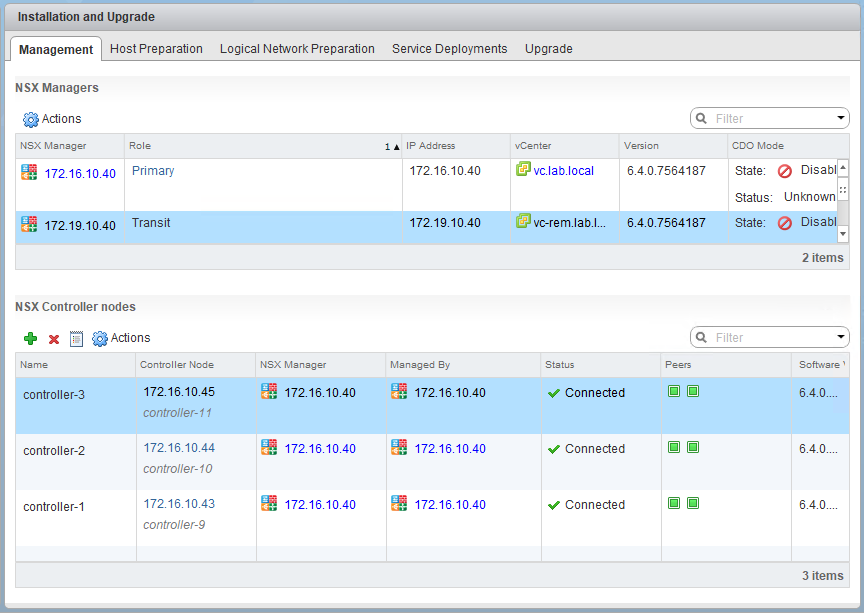
tshoot7a-1

It looks like the 172.19.10.40 NSX manager is currently in Transit mode. This means that it was removed as a secondary at some point but has not been converted to a standalone. This is the operation that is failing:

tshoot7a-2

Continue reading “NSX Troubleshooting Scenario 7”

USB Passthrough and vMotion

I was recently speaking with someone about power management in a home lab environment. Their plan was to use USB passthrough to connect a UPS to a virtual machine in a vSphere cluster. From there, they could use PowerCLI scripting to gracefully power off the environment if the UPS battery got too low. This sounded like a wise plan.

Their concern was that the VM would need to be pinned to the host where the USB cable was connected and that vMotion would not be possible. To their pleasant surprise, I told them that support for vMotion of VMs with USB passthrough had been added at some point in the past and it was no longer a limitation.

When I started looking more into this feature, however, I discovered that this was not a new addition at all. In fact, this has been supported ever since USB passthrough was introduced in vSphere 4 over seven years ago. Have a look at the vSphere Administration Guide for vSphere 4 on page 105 for more information.

I had done some work with remote serial devices in the past, but I’ve never been in a situation where I needed to vMotion a VM with a USB device attached. It’s time to finally take this functionality for a test drive.

Continue reading “USB Passthrough and vMotion”