Changing ESG/DLR Tenant After Deployment

Using NSX REST API calls to modify ESG/DLR configuration that isn’t exposed in the UI.

If you are reading this post, you’ve probably already come to the realization that the ‘Tenant’ field for ESGs can’t be changed in the UI. Once the appliance is deployed, this string value appears set in stone.

changetenant-1
Adding the Tenant and Description are easy during deployment, but can’t be changed in the UI after deployment.

Although it can’t be modified in the UI without creating a new appliance from scratch, it’s pretty easy to modify this field via REST API calls. After having come across a question on the VMware communities forum regarding this, I thought I’d write a quick post on the process.

Step 1: Retrieve the ESG/DLR Configuration

First, you’ll need to do a GET call to retrieve the current ESG/DLR configuration in XML format. I won’t cover the basics of REST API calls in this post as the topic is well covered elsewhere. If you’ve never done REST API calls before, I’d recommend doing some reading on the subject before proceeding.

I’ll be using the popular Postman utility for this. First, we’ll need to find the moref identifier of the ESG/DLR in question.

changetenant-2
We’re interested in mercury-esg1, which is edge-4 in my lab environment.

You can easily find this from the ‘Edges’ view in the UI. In my case, I want to modify the edge called mercury-esg1, which is edge-4. Notice that someone put the string ‘test’ in as the tenant, which we want to change to ‘mercury’.
From Postman, we’ll run the following API call to retrieve edge-4’s configuration:

GET https://<nsxmgrip>/api/4.0/edges/edge-4

I got a 200 OK response, with all the config in XML format returned.

changetenant-3
All of the ESG’s configuration was returned in XML format. This is everything needed to recreate or modify the appliance.

Step 2: Make the Necessary Changes

Next, I’ll copy and paste all the returned XML data into a text editor. The XML section for the tenant string is right near the top:

<edge>
    <id>edge-4</id>
    <version>32</version>
    <status>deployed</status>
    <datacenterMoid>datacenter-2</datacenterMoid>
    <datacenterName>Toronto</datacenterName>
    <tenant>test</tenant>
...

I will simply change <tenant>test</tenant> to <tenant>mercury</tenant>.

Step 3: Apply the Modified Configuration

The final step is to take your modified XML configuration data and apply it back to the ESG/DLR in question. This is as simple as changing your REST API call from GET to PUT and pasting the modified configuration into the ‘Body’ of the call.

changetenant-4
Be sure to double check your configuration before sending the PUT call!

If your call was successful, you should get a 204 No Content response.

changetenant-5

And there you have it – the tenant field has been updated. Unfortunately, I haven’t had any success updating the description field via API. The <description> tag appears to be ignored in this PUT call for some reason. If anyone has any success with this, please let me know.

PowerNSX Alternative

If you prefer using PowerNSX to API calls, the Set-NsxEdge cmdlet can also work. The cmdlet uses the same API calls behind the scene, but can be quicker to execute:

PS C:\Users\mike.VSWITCHZERO> $edge = get-nsxedge mercury-esg1
PS C:\Users\mike.VSWITCHZERO> $edge.tenant = "hello"
PS C:\Users\mike.VSWITCHZERO> set-nsxedge $edge

Edge Services Gateway update will modify existing Edge configuration.
Proceed with Update of Edge Services Gateway mercury-esg1?
[Y] Yes [N] No [?] Help (default is "N"): y


id : edge-4
version : 37
status : deployed
datacenterMoid : datacenter-2
datacenterName : Toronto
tenant : hello
name : mercury-esg1
fqdn : mercury-esg1.mercury.local
enableAesni : true
enableFips : false
vseLogLevel : info
vnics : vnics
appliances : appliances
cliSettings : cliSettings
features : features
autoConfiguration : autoConfiguration
type : gatewayServices
isUniversal : false
hypervisorAssist : false
tunnels :
edgeSummary : edgeSummary
NSX Troubleshooting Scenario 13 – Solution

Welcome to the thirteenth installment of a new series of NSX troubleshooting scenarios. Thanks to everyone who took the time to comment on the first half of the scenario. Today I’ll be performing some troubleshooting and will show how I came to the solution.

Please see the first half for more detail on the problem symptoms and some scoping.

Getting Started

As you’ll recall in the first half, our fictional customer was having issues re-deploying ESGs and DLRs that had been removed from the vCenter inventory. This was all part of a cleanup activity that occurred due to a SAN outage.

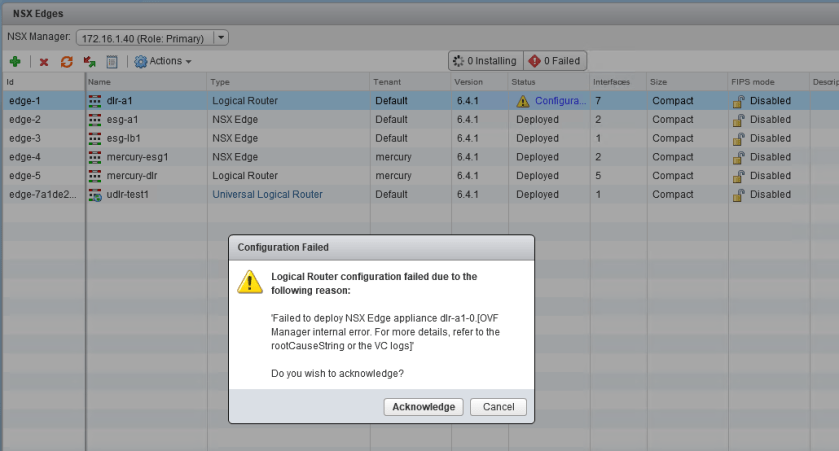
tshoot13a-5
Not a very informative error message. We’ll need to refer to the logging to find out more.

To begin, we’ll really need more information on exactly why NSX is failing to re-deploy these ESGs and DLRs. The message in the UI is not very informative. As mentioned, there are no failed tasks in the vCenter recent tasks pane when an attempt is made, so we’ll need to go digging into the logging to find out more.

Taking a look at the vsm.log file on the NSX Manager appliance, we can see a backtrace occur at the same time as the deployment attempt:

2018-12-06 23:43:17.681 GMT+00:00 ERROR TaskFrameworkExecutor-19 Worker:219 - - [nsxv@6876 comp="nsx-manager" subcomp="manager"] BaseException thrown while executing task instance taskinstance-100656 com.vmware.vshield.edge.exception.EdgeVmDeploymentFailedException: nested exception is com.vmware.vshield.vsm.inventory.vcoperations.OvfManagerInternalErrorException:
core-services:1100:OVF Manager internal error. For more details, refer to the rootCauseString or the VC logs:
Managed object id datastore-26 of type Datastore was not found in VC.

The key part of the message that is of interest is the following:

“Managed object id datastore-26 of type Datastore was not found in VC.”

Continue reading “NSX Troubleshooting Scenario 13 – Solution”

NSX Troubleshooting Scenario 13

Welcome to the thirteenth installment of my NSX troubleshooting series. What I hope to do in these posts is share some of the common issues I run across from day to day. Each scenario will be a two-part post. The first will be an outline of the symptoms and problem statement along with bits of information from the environment. The second will be the solution, including the troubleshooting and investigation I did to get there.

The Scenario

As always, we’ll start with a brief problem statement:

“After recovering from a storage outage, we’re unable to re-deploy any of our missing DLRs and ESGs. Help!”

With this type of a problem description, the first order of business is to find out EXACTLY what happened. After a lengthy discussion with the fictional customer, we were able to piece together the following sequence of events:

  1. The SAN suffered a catastrophic failure.
  2. All of the LUNs were continuously replicated to another SAN over the years, so these replicated LUNs were presented to the hosts in the compute-a cluster.
  3. After a rescan, the VMFS volumes were re-signatured and the datastores and all files were again accessible.
  4. All of the VMs on those datastores were manually added back to the vCenter Inventory except the DLRs and ESGs.
  5. All DLRs and ESGs were deleted from the datastore so that they could be freshly re-deployed.

The customer did realize that in point number 5 above that any ESGs re-added to the inventory would no longer be valid because of mismatched UUIDs. Deleting these from disk and re-deploying was a good idea.

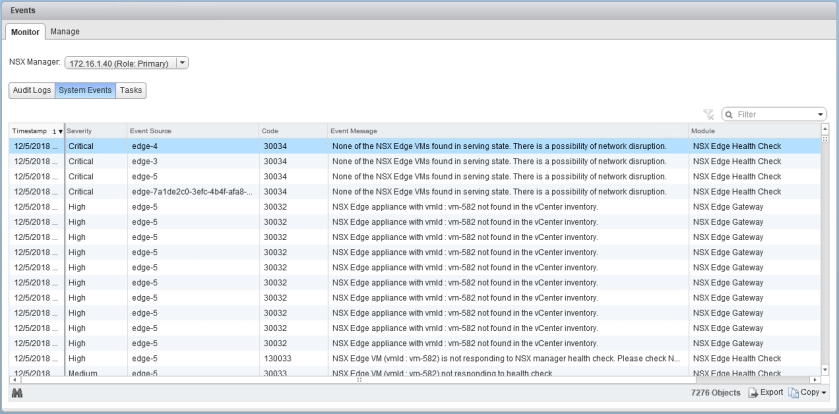
NSX is throwing many high and critical events because of the missing ESG and DLR appliances, as expected.

tshoot13a-1

There are six appliances in total, including three DLRs and three ESGs.

Continue reading “NSX Troubleshooting Scenario 13”

NSX Troubleshooting Scenario 11

Welcome to the eleventh installment of my NSX troubleshooting series. What I hope to do in these posts is share some of the common issues I run across from day to day. Each scenario will be a two-part post. The first will be an outline of the symptoms and problem statement along with bits of information from the environment. The second will be the solution, including the troubleshooting and investigation I did to get there.

The Scenario

As always, we’ll start with a brief problem statement:

“One of my ESXi hosts has a hardware problem. Ever since putting it into maintenance mode, I’m getting edge high availability alarms in the NSX dashboard. I think this may be a false alarm, because the two appliances are in the correct active and standby roles and not in split-brain. Why is this happening?”

A good question. This customer is using NSX 6.4.0, so the new HTML5 dashboard is what they are referring to here. Let’s see the dashboard alarms first hand.

tshoot11a-1

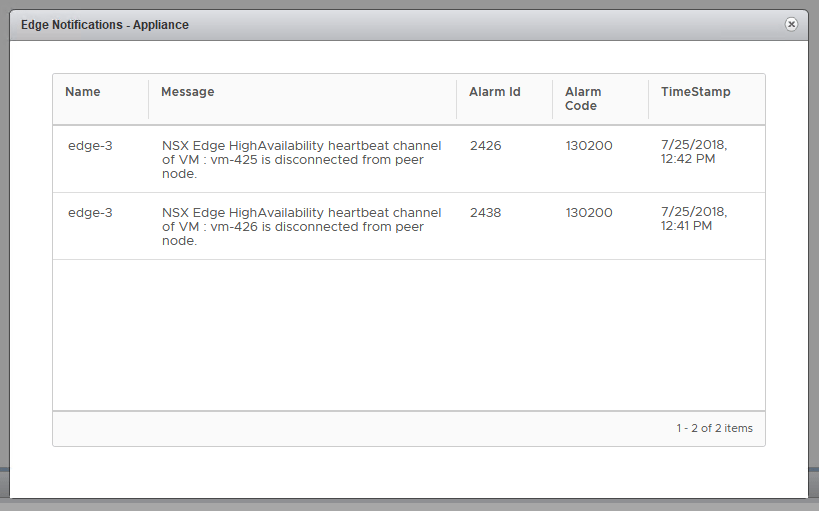
This is alarm code 130200, which indicates a failed HA heartbeat channel. This simply means that the two ESGs can’t talk to each other on the HA interface that was specified. Let’s have a look at edge-3, which is the ESG in question.

Continue reading “NSX Troubleshooting Scenario 11”