NSX Troubleshooting Scenario 6 – Solution

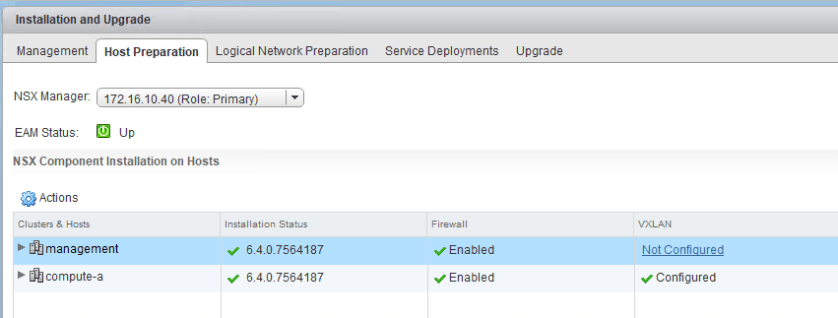
As we saw in the first half of scenario 6, a fictional administrator enabled the DFW in their management cluster, which caused some unexpected filtering to occur. Their vCenter Server was no longer allowed the necessary HTTPS port 443 traffic needed for the vSphere Web Client to work.

Since we can no longer manage the environment or the DFW using the UI, we’ll need to revert this change using some other method.

As mentioned previously, we are fortunate in that NSX Manager is always excluded from DFW filtering by default. This is done to protect against this very type of situation. Because the NSX management plane is still fully functional, we should – in theory – still be able to relay API based DFW calls to NSX Manager. NSX Manager will in turn be able to publish these changes to the necessary ESXi hosts.

There are two relatively easy ways to fix this that come to mind:

  1. Use the approach outlined in KB 2079620. This is the equivalent of doing a factory reset of the DFW ruleset via API. This will wipe out all rules and they’ll need to be recovered or recreated.
  2. Use an API call to disable the DFW in the management cluster. This will essentially revert the exact change the user did in the UI that started this problem.

There are other options, but above two will work to restore HTTP/HTTPS connectivity to vCenter. Once that is done, some remediation will be necessary to ensure this doesn’t happen again. Rather than picking a specific solution, I’ll go through both of them.

Continue reading “NSX Troubleshooting Scenario 6 – Solution”
NSX Troubleshooting Scenario 6

Welcome to the sixth installment of my new NSX troubleshooting series. What I hope to do in these posts is share some of the common issues I run across from day to day. Each scenario will be a two-part post. The first will be an outline of the symptoms and problem statement along with bits of information from the environment. The second will be the solution, including the troubleshooting and investigation I did to get there.

NSX Troubleshooting Scenario 6

As always, we’ll start with a brief customer problem statement:

“Help! It looks like we accidentally blocked access to vCenter Server! We have two clusters, a compute and a management cluster. My colleague noticed the firewall was disabled on the management cluster and turned it on. As soon as he did that we lost all access to the vSphere Web Client.”

Well, this sounds like a ‘chicken or the egg dilemma’ – how can they recover if they can’t log in to the vSphere Web Client to revert the changes that broke things?

In speaking with our fictional customer, we learn that some rules are in place to block all HTTP/HTTPS access in the compute cluster. Because they are still deploying VMs and getting everything patched, they are using this as a temporary means to prevent all web access. Unfortunately, he can’t remember exactly what was configured in the firewall and there may be other restrictions in place.

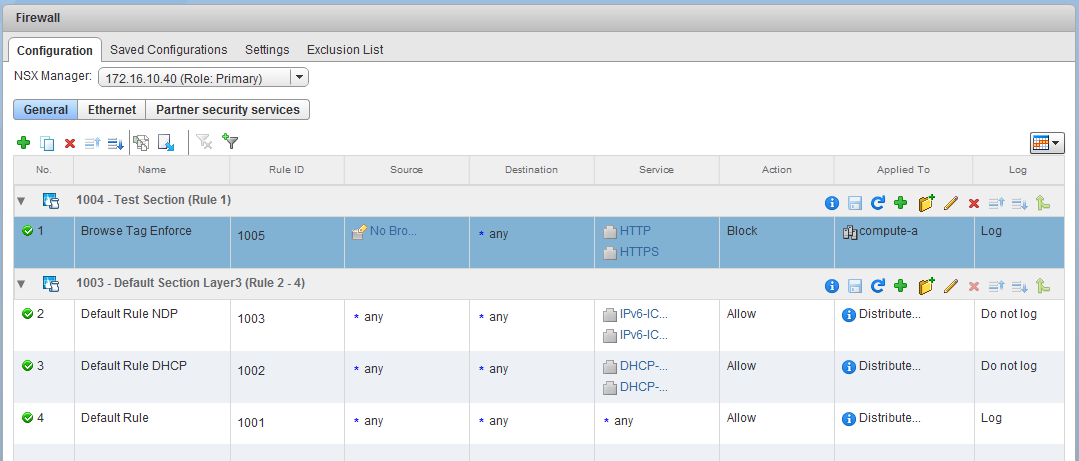
This was a screenshot of the last thing he saw before his web client session started timing out:

tshoot6a-1

Starting with some basic ping tests, we can see that the vCenter Server and NSX Manager are both still accessible from a layer-3 perspective:

Continue reading “NSX Troubleshooting Scenario 6”

Unboxing a 22 Year Old Microsoft Mouse

Finding a functional serial mouse for my ongoing 486 restoration project has been a challenge. Up until now, my retro rigs have had PS/2 ports that work with a variety of older optical mice. This isn’t the case with many custom-built systems from the early to mid-nineties. Unless your system was an IBM or some other name brand, you likely had to use a serial mouse.

Because of the peripheral divide in those days, there was demand for PS/2 as well as serial mice. This prompted manufacturers to create what was then known as ‘combo mice’. These mice would come with a simple PS/2 to serial adapter to allow support for both standards. When it came to keyboards, most if not all PS/2 keyboards were compatible with the common 5-pin DIN connector with a simple adapter. This is because the two connectors are electrically compatible and just need pin translation. With mice, however, this is not the case. For a PS/2 mouse to work with a PS/2 to serial adapter, it must have hardware support for both standards under the hood. Today I’m going to be looking at one of the iconic combo mice from the mid-nineties – the Microsoft Mouse.

msmouse_1

I was fortunate enough to find this ‘new old stock’ mouse on eBay from a Canadian seller. It was brand new and still sealed, which is quite rare these days. Most of the serial compatible mice I’ve come across are quite worse for wear and demand exorbitant prices.

Continue reading “Unboxing a 22 Year Old Microsoft Mouse”

Missing NSX vdrPort and Auto Deploy

If you are running Auto Deploy and noticed your VMs didn’t have connectivity after a host reboot or upgrade, you may have run into the problem described in VMware KB 52903. I’ve seen this a few times now with different customers and thought a PSA may be in order. You can find all the key details in the KB, but I thought I’d add some extra context here to help anyone who may want more information.

I recently helped to author VMware KB 52903, which has just been made public. Essentially, it describes a race condition causing a host to come up without its vdrPort connected to the distributed switch. The vdrPort is an important component on an ESXi host that funnels traffic to/from the NSX DLR module. If this port isn’t connected, traffic can’t make it to the DLR for east/west routing on that host. Technically, VMs in the same logical switches will be able to communicate across hosts, but none of the VMs on this impacted host will be able to route.

The Problem

The race condition occurs when the DVS registration of the host occurs too late in the boot process. Normally, the distributed switch should be initialized and registered long before the vdrPort gets connected. In some situations, however, DVS registration can be late. Obviously, if the host isn’t yet initialized/registered with the distributed switch, any attempt to connect something to it will fail. And this is exactly what happens.

Using the log lines from KB 52903 as an example, we can see that the host attempts to add the vdrPort to the distributed switch at 23:44:19:

2018-02-08T23:44:19.431Z error netcpa[3FFEDA29700] [Originator@6876 sub=Default] Failed to add vdr port on dvs 96 ff 2c 50 0e 5d ed 4a-e0 15 b3 36 90 19 41 5d, Not found

The reason the operation fails is because the DVS switch with the UUID specified is not found from the perspective of this host. It simply hasn’t been initialized yet. A few moments later, the DVS is finally ready for use on the host. Notice the time stamps – you can see the registration of the DVS about 9 seconds later:

2018-02-08T23:44:28.389Z info hostd[4F540B70] [Originator@6876 sub=Hostsvc.DvsTracker] Registered Dvs 96 ff 2c 50 0e 5d ed 4a-e0 15 b3 36 90 19 41 5d

The above message can be found in /var/log/hostd.log.

Continue reading “Missing NSX vdrPort and Auto Deploy”

Configuring a Proxy in Photon OS

I’ve been playing around recently with VMware’s new Photon OS platform. Thanks to it’s incredibly small footprint and virtualization-specific tuning, it looks like an excellent building block for a custom appliance I’m hoping to build. To keep the appliance as small as possible, I used the minimal deployment and then planned to install packages as required.

After deploying the appliance, I hit a roadblock as the package management tool called tdnf couldn’t reach any of the repositories. This was expected as my home lab is isolated and I have to go through a squid proxy server to get to the outside world.

root@photon-machine [ ~ ]# tdnf repolist
curl#7: Couldn't connect to server
Error: Failed to synchronize cache for repo 'VMware Photon Linux 2.0(x86_64) Updates' from 'https://dl.bintray.com/vmware/photon_updates_2.0_x86_64'
Disabling Repo: 'VMware Photon Linux 2.0(x86_64) Updates'
curl#7: Couldn't connect to server
Error: Failed to synchronize cache for repo 'VMware Photon Linux 2.0(x86_64)' from 'https://dl.bintray.com/vmware/photon_release_2.0_x86_64'
Disabling Repo: 'VMware Photon Linux 2.0(x86_64)'
curl#7: Couldn't connect to server
Error: Failed to synchronize cache for repo 'VMware Photon Extras 2.0(x86_64)' from 'https://dl.bintray.com/vmware/photon_extras_2.0_x86_64'
Disabling Repo: 'VMware Photon Extras 2.0(x86_64)'

When trying to build the package cache, you can see that the the synchronization fails to specific HTTPS locations over port 443.

After having a quick look through the Photon administration guide, I was surprised to see that there wasn’t anything regarding proxy configuration listed – at least not at the time of writing. Doing some digging online turned up several possibilities. There seems to be numerous places in which a proxy can be defined – including in the kubernetes configuration, or specifically for the tdnf package manager.

The simplest way to get your proxy configured for tdnf, as well as other tools like WGET and Curl is to define a system-wide proxy. You’ll find the relevant configuration in the /etc/sysconfig/proxy file:

Continue reading “Configuring a Proxy in Photon OS”

The 486 Restoration – Part 3

Welcome to part three of my 486 restoration project! Check out part one and two for more information on the parts I rescued from a badly neglected machine. I’m happy to report that the purchase of this banged up machine was not in vain. It didn’t come without it’s share of challenges but as you’ll see in this installment – it’s alive!

After removing the barrel battery and constructing an external battery pack in part 2, the next order of business was to get the machine put together on the work bench and powered up.

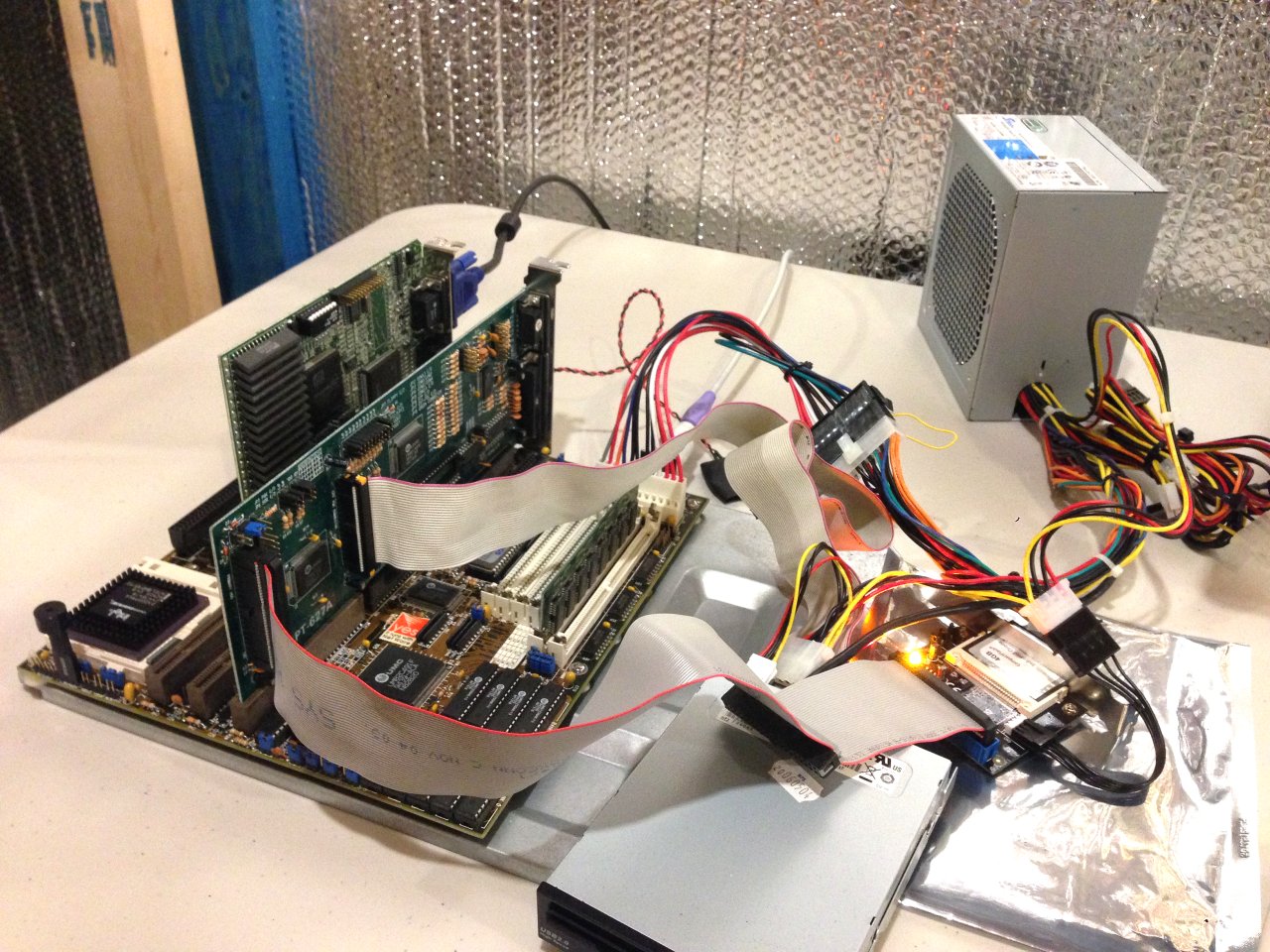
486_3-1
My test-bench isn’t pretty but it’s functional!

I’m using a modern PFC Seasonic 350W power supply with an AT 12-pin adapter. These old systems run almost entirely on 5 volt power and draw nothing from the 3.3V and little from the +12V rails. This can cause problems with some newer PSUs, but this Seasonic model fairs well with a 130W rating on the 5V rail. The only side effect of this power draw imbalance is a higher than usual +12.6V on the 12V rail. It’s not ideal, but I’d rather this than a flaky 25 year old AT power supply.

Since the system didn’t come with a video card, I pulled out an old ATI Mach 32 ISA card from the parts bin.


I recently picked this up from the great folks in the computer recycling department of The Working Center in Kitchener. It was sitting in a box full of old PCI graphics cards destined for e-waste. It’s always awesome to keep classic parts out of the landfill and support a great cause at the same time.

Continue reading “The 486 Restoration – Part 3”

NSX Troubleshooting Scenario 5 – Solution

Welcome to the fifth installment of a new series of NSX troubleshooting scenarios. Thanks to everyone who took the time to comment on the first half of scenario five. Today I’ll be performing some troubleshooting and will resolve the issue.

Please see the first half for more detail on the problem symptoms and some scoping.

Reader Suggestions

There were a few good suggestions from readers. Here are a couple from Twitter:

Good suggestions – we want to ensure that the distributed firewall dvFilters are applied to the vNICs of the VMs in question. Looking at the rules from the host’s perspective is also a good thing to check.

The suggestion about VMware tools may not seem like an obvious thing to check, but you’ll see why in the troubleshooting below.

Getting Started

In the first half of this scenario, we saw that the firewall rule and security group were correctly constructed. As far as we could tell, it was working as intended with two of the three VMs in question.

tshoot5a-1

Only the VM lubuntu-1.lab.local seemed to be ignoring the rule and was instead hitting the default allow rule at the bottom of the DFW. Let’s summarize:

  • VM win-a1 and lubuntu-2 are working fine. I.e. they can’t browse the web.
  • VM lubuntu-1 is the only one not working. I.e. it can still browse the web.
  • The win-a1 and lubuntu-2 VMs are hitting rule 1005 for HTTP traffic.
  • The lubuntu-1 VM is hitting rule 1001 for HTTP traffic.
  • All three VMs have the correct security tag applied.
  • All three VMs are indeed showing up correctly in the security group due to the tag.
  • The two working VMs are on host esx-a1 and the broken VM is on host esx-a2

To begin, we’ll use one of the reader suggestions above. I first want to take a look at host esx-a2 and confirm the DFW is correctly synchronized and that the lubuntu-1 VM does indeed have the DFW dvFilter applied to it.

Continue reading “NSX Troubleshooting Scenario 5 – Solution”

NSX Troubleshooting Scenario 5

Welcome to the fifth installment of my new NSX troubleshooting series. What I hope to do in these posts is share some of the common issues I run across from day to day. Each scenario will be a two-part post. The first will be an outline of the symptoms and problem statement along with bits of information from the environment. The second will be the solution, including the troubleshooting and investigation I did to get there.

NSX Troubleshooting Scenario 5

As always, we’ll start with a brief customer problem statement:

“We’ve just deployed NSX and are doing some testing with the distributed firewall. We created a security tag that we can apply to VMs to prevent them from browsing the web. We applied this tag on three virtual machines. It seems to work on two of them, but the third can always browse the web! Something is not working here”

After speaking to the customer, we were able to collect a bit more information about the VMs and traffic flows in question. Below are the VMs that should not be able to browse:

  • win-a1.lab.local – 172.17.1.30 (static)
  • lubuntu-1.lab.local – 172.17.1.101 (DHCP)
  • lubuntu-2.lab.local – 172.17.1.104 (DHCP)

Only the VM called lubuntu-1 is still able to browse. The others are fine. The customer has been using an internal web server called web-a1.lab.local for testing. That machine is in the same cluster and has an IP address of 172.17.1.11. It serves up a web page on port 80. All of the VMs in question are sitting in the same logical switch and the customer reports that all east-west and north-south routing is functioning normally.

To begin, let’s have a look at the DFW rules defined.

tshoot5a-1

As you can see, they really did just start testing as there is only one new section and a single non-default rule. The rule is quite simple. Any HTTP/HTTPS traffic coming from VMs in the ‘No Browser’ security group should be blocked. We can also see that both this rule and the default were set to log as part of the troubleshooting activities.

Continue reading “NSX Troubleshooting Scenario 5”

The 486 Restoration – Part 2

Welcome to part two of my 486 restoration project! In my last post, I took a look at some of the rescued parts from a badly neglected tower. Today, I’ll be going through my adventures of getting a functional CMOS battery working on this system.

As mentioned briefly in part one, most 386 and early 486 systems included what are referred to as ‘barrel batteries’. These are rechargeable nickel cadmium (NiCAD) batteries and are usually rated at 3.6V fully charged. Unlike the coin cell batteries in newer systems, the battery charges whenever the system is powered on. In theory, this was great because the CMOS battery could last a long time in the system. Using a multi-cell rechargeable battery increases the cost of the board, so the CR2032 coin cell solutions were most likely used for cost savings first and foremost in the years following. This is all well and good, but nobody really envisioned these systems to be in use 25 years later as is the case with this system here.

486-8
A 25 year old Varta 3.6V NiCAD – it’s gotta go before the inevitable happens.

A quick google search on these barrel batteries, and you’ll see just how problematic these can be when they age. Not only can they leak and cease to function, but when they do they are very corrosive to copper traces and other types of metal on the board. If caught early enough, the board can be cleaned and may still be functional. Unfortunately, the damage can sometimes be permanent.

Continue reading “The 486 Restoration – Part 2”

Using SDelete and vmkfstools to Reclaim Thin VMDK Space

Using thin provisioned virtual disks can provide many benefits. Not only do they allow over-provisioning, but with the prevalence of flash storage, performance degradation really isn’t a concern like it used to be.

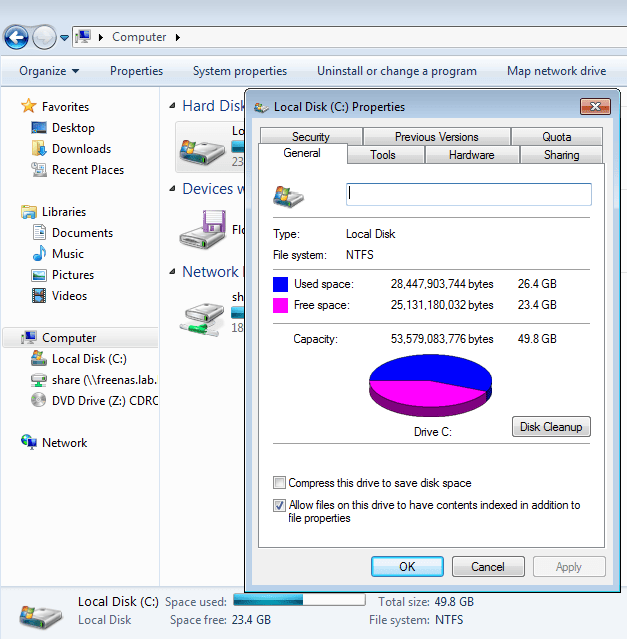
I recently ran into a situation in my home lab where my Windows jump box ran out of disk space. I had downloaded a bunch of OVA and ISO files and had forgotten to move them over to a shared drive that I use for archiving. I expanded the disk by 10GB to take it from 40GB to 50GB, and moved off all the large files. After this, I had about 26GB used and 23GB free – much better.

thindisk-1

Because that jump box is sitting on flash storage – which is limited in my lab – I had thin provisioned this VM to conserve as much disk space as possible. Despite freeing up lots of space, the VM’s VMDK was still consuming a lot more than 26GB.

Notice below that doing a normal directory listing displays the maximum possible size of a thin disk. In this case, the disk has been expanded to 50GB:

[root@esx0:/vmfs/volumes/58f77a6f-30961726-ac7e-002655e1b06c/jump] ls -lha
total 49741856
drwxr-xr-x 1 root root 3.0K Feb 12 21:50 .
drwxr-xr-t 1 root root 4.1K Feb 16 16:13 ..
-rw-r--r-- 1 root root 41 Jun 16 2017 jump-7a99c824.hlog
-rw------- 1 root root 13 May 29 2017 jump-aux.xml
-rw------- 1 root root 4.0G Nov 25 18:47 jump-c49da2be.vswp
-rw------- 1 root root 3.1M Feb 12 21:50 jump-ctk.vmdk
-rw------- 1 root root 50.0G Feb 16 17:55 jump-flat.vmdk
-rw------- 1 root root 8.5K Feb 16 15:26 jump.nvram
-rw------- 1 root root 626 Feb 12 21:50 jump.vmdk

Using the ‘du’ command – for disk usage – we can see the flat file containing the data is still consuming over 43GB of space:

[root@esx0:/vmfs/volumes/58f77a6f-30961726-ac7e-002655e1b06c/jump] du -h *flat*.vmdk
43.6G jump-flat.vmdk

That’s about 40% wasted space.

Continue reading “Using SDelete and vmkfstools to Reclaim Thin VMDK Space”