Noctua NH-U9DX i4 and NH-D9DX i4 3U Heatsink Review

There are many different approaches you can take when building a VMware home lab, but I always prefer to do custom-build tower systems. This allows me to select the components I want – the fans, heatsinks, PSU – to keep the noise to a minimum. Even though I keep the lab in the basement, I really don’t like to hear it running. I don’t need the density that a rack provides, and I’m quite happy to have my nearly silent towers humming along on a wire shelf instead. Not to mention that lower noise usually equates to lower power consumption and of course, it keeps my wife happy as well – the most critical metric of all.

I finally got around to upgrading my three ancient compute nodes recently. I have been using the included Dynatron R13 1U copper heatsinks that came with the motherboards I bought on eBay. They work, and keep the CPUs relatively cool, but as you can imagine, noise was not a key consideration in their design. They are as compact and as efficient as possible at only an inch tall. At idle, the Supermicro X9SRL-F keeps them at a low RPM, but put any load on the systems and you’re quickly at 7500RPM and the noise is pretty unbearable. No problem for a datacenter, but not for a home lab.

Today I’ll be taking a bit of a departure from my regular posts and will be doing an in-depth review of two high-end Noctua heatsinks. Noctua was kind enough to send me a review sample of not one, but two of their Xeon heatsinks – the NH-U9DX i4 and the NH-D9DX i4 3U.

Noctua

noctua_200x200pxNoctua is an Austrian company well known for their low noise fans and high-end heatsinks. I’ve been using Noctua heatsinks for ages. In fact, I reviewed some of their original heatsinks and fans many years ago when I used to write hardware reviews. This included their original NH-U12P, the NH-C12P and the smaller NH-U9B. Back then, I praised them for their high-quality construction, near silent operation, excellent mounting hardware and most importantly – excellent cooling performance. That was over ten years ago, and it seems that Noctua is still very well respected for all the same reasons today.

Their gear has always been pricey compared to the competition, but when it comes to Noctua, you get what you pay for.

Square vs Narrow ILM LGA 2011

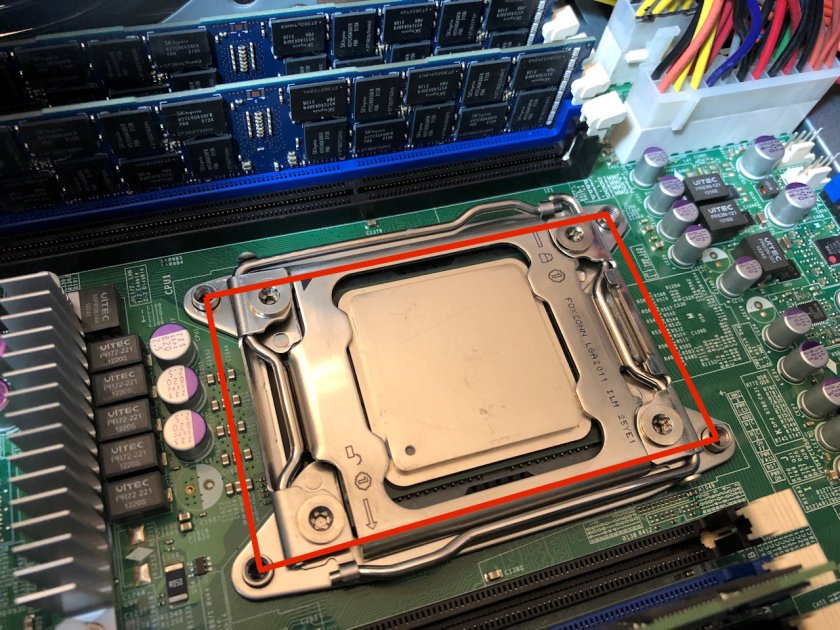
One of the challenges I had with my new/used Supermicro X9SRL-F boards is that they don’t use the common ‘square’ LGA2011 mounting pattern. Instead, they use what’s referred to as ‘Narrow ILM’ that allows the socket to be more rectangular in shape. This allows more real estate for memory slots and other components on the board. Because of this, I was severely limited in my heatsink choices. Most of what’s available out there for Narrow ILM are rack mount heatsinks similar to what I’m hoping to remove. The majority of the consumer-grade stuff for LGA2011 simply won’t fit.
noctuai4-24

Here you can see the Dynatron R13 narrow ILM heatsink mounted:

Continue reading “Noctua NH-U9DX i4 and NH-D9DX i4 3U Heatsink Review”
NSX-T Troubleshooting Scenario 1

Welcome to the first NSX-T troubleshooting scenario! My NSX-V troubleshooting scenarios have been well received, so I thought it was time to start a new series for NSX-T. If you’ve got an idea for a scenario, please let me know!

What I hope to do in these posts is share some of the common issues I run across from day to day. Each scenario will be a two-part post. The first will be an outline of the symptoms and problem statement along with bits of information from the environment. The second will be the solution, including the troubleshooting and investigation I did to get there.

The Scenario

As always, we’ll start with a brief problem statement:

“I removed NSX for vSphere from my lab environment and am trying to install NSX-T for a proof of concept. Unfortunately, I get an error message every time I try to install the NSX-T VIBs on my ESXi hosts! I’m running NSX-T 2.3.1, and ESXi 6.5 U2”

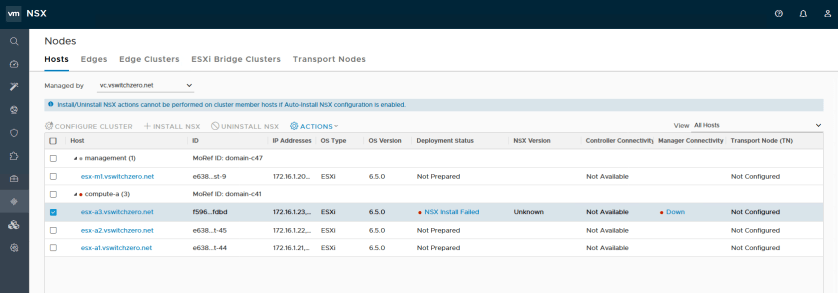
In the NSX-T UI, we’re greeted with a simple “NSX Install Failed” message for the host esx-a3:

nsxt-tshoot1a

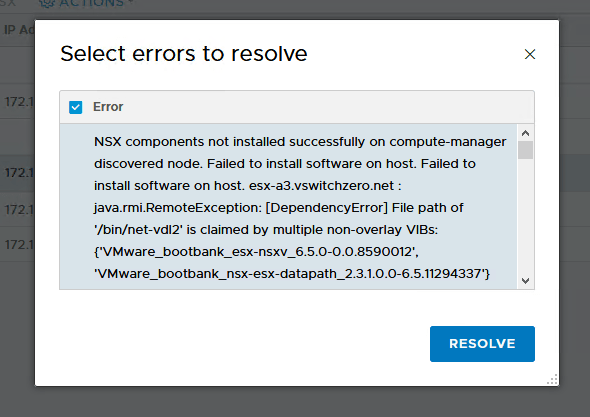
Clicking on this error gives us a much more verbose error message:

nsxt-tshoot1a-5

The full text of the error message is as follows:

NSX components not installed successfully on compute-manager discovered node. Failed to install software on host. Failed to install software on host. esx-a3.vswitchzero.net : java.rmi.RemoteException: [DependencyError] File path of '/bin/net-vdl2' is claimed by multiple non-overlay VIBs: {'VMware_bootbank_esx-nsxv_6.5.0-0.0.8590012', 'VMware_bootbank_nsx-esx-datapath_2.3.1.0.0-6.5.11294337'} File path of '/bin/vsip_vm_list.sh' is claimed by multiple non-overlay VIBs: {'VMware_bootbank_esx-nsxv_6.5.0-0.0.8590012', 'VMware_bootbank_nsx-esx-datapath_2.3.1.0.0-6.5.11294337'} File path of '/etc/vmware/firewall/netCPRuleset.xml' is claimed by multiple non-overlay VIBs: {'VMware_bootbank_nsx-netcpa_2.3.1.0.0-6.5.11294485', 'VMware_bootbank_esx-nsxv_6.5.0-0.0.8590012'} File path of '/bin/vsipioctl' is claimed by multiple non-overlay VIBs: {'VMware_bootbank_esx-nsxv_6.5.0-0.0.8590012', 'VMware_bootbank_nsx-esx-datapath_2.3.1.0.0-6.5.11294337'} File path of '/usr/lib/vmware/vm-support/bin/dump-vdr-info.sh' is claimed by multiple non-overlay VIBs: {'VMware_bootbank_esx-nsxv_6.5.0-0.0.8590012', 'VMware_bootbank_nsx-esx-datapath_2.3.1.0.0-6.5.11294337'} File path of '/bin/net-vdr' is claimed by multiple non-overlay VIBs: {'VMware_bootbank_esx-nsxv_6.5.0-0.0.8590012', 'VMware_bootbank_nsx-esx-datapath_2.3.1.0.0-6.5.11294337'} File path of '/etc/vmsyslog.conf.d/dfwpktlogs.conf' is claimed by multiple non-overlay VIBs: {'VMware_bootbank_nsx-netcpa_2.3.1.0.0-6.5.11294485', 'VMware_bootbank_esx-nsxv_6.5.0-0.0.8590012'} File path of '/etc/init.d/netcpad' is claimed by multiple non-overlay VIBs: {'VMware_bootbank_nsx-netcpa_2.3.1.0.0-6.5.11294485', 'VMware_bootbank_esx-nsxv_6.5.0-0.0.8590012'} File path of '/usr/lib/vmware/netcpa/bin/netcpa' is claimed by multiple non-overlay VIBs: {'VMware_bootbank_nsx-netcpa_2.3.1.0.0-6.5.11294485', 'VMware_bootbank_esx-nsxv_6.5.0-0.0.8590012'} File path of '/bin/dfwpktlogs.sh' is claimed by multiple non-overlay VIBs: {'VMware_bootbank_nsx-netcpa_2.3.1.0.0-6.5.11294485', 'VMware_bootbank_esx-nsxv_6.5.0-0.0.8590012'} File path of '/etc/vmware/firewall/bfdRuleset.xml' is claimed by multiple non-overlay VIBs: {'VMware_bootbank_nsx-netcpa_2.3.1.0.0-6.5.11294485', 'VMware_bootbank_esx-nsxv_6.5.0-0.0.8590012'} File path of '/etc/vmware/vm-support/dfw.mfx' is claimed by multiple non-overlay VIBs: {'VMware_bootbank_esx-nsxv_6.5.0-0.0.8590012', 'VMware_bootbank_nsx-esx-datapath_2.3.1.0.0-6.5.11294337'} Please refer to the log file for more details.

Clicking on the RESOLVE button simply tries the install again, which fails.

Continue reading “NSX-T Troubleshooting Scenario 1”

NSX-T PCPU Requirements for Edges

New CPU requirements for NSX-T may leave older lab hardware out in the cold.

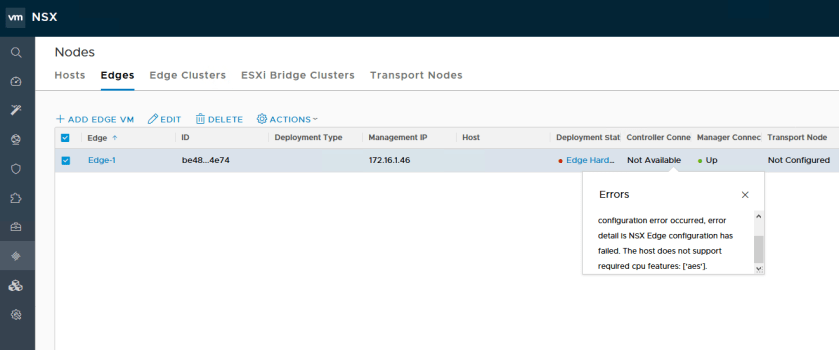
If you are running old hardware in your lab, you may have come across an unexpected failure while deploying your first NSX-T edge VM.

nsxt-aes-edge-1

The exact error message will be something similar to:

“[Fabric] Edge <uuid> is not ready for configuration error occurred, error detail is NSX Edge configuration has failed. The host does not support required cpu features: [‘aes’].”

The edge will be successfully deployed, but will remain ‘unconfigured’ and will not allow you to add it as a transport node.

The ‘aes’ feature being referred to is Intel’s AES-NI acceleration for cryptography. You can find out more about AES-NI here. In NSX-V, AES-NI was optionally supported for offloading cryptography for VPN related features. It seems that this has now become a hard requirement for NSX-T.

Unfortunately, like vSphere 6.7, NSX-T has minimum CPU requirements that can’t be worked around. If you have a browse through the NSX-T system requirements, you’ll find a note about CPU compatibility in the “NSX Edge VM and Bare-Metal NSX Edge CPU Requirements” section. Listed there is reference to:

  • Xeon 56xx (Westmere-EP)
  • Xeon E7-xxxx (Westmere-EX and later CPU generation)
  • Xeon E5-xxxx (Sandy Bridge and later CPU generation)

This means that anything released prior to 2011 is unlikely to work, with the exception of a few Westermere EP based Xeons, which seem to have spotty success. On the AMD front, it appears that even CPUs with AES instructions will fail similarly due to a CPU compatibility check that is done during edge deployment.

Update: Commenter Ben Kenobi figured out a workaround to get edges to deploy on modern AMD platforms! You can find his workaround discussed below in the comments as well as on his blog here.

My management host uses Xeon E5-2670s, which work fine, but my compute cluster uses very old Xeon X3440s that came out before AES-NI was introduced. Now that I can’t run vSphere 6.7 or an NSX-T edge on these hosts, I think it may finally be time to upgrade.

Unfortunately, it doesn’t appear that there is a workaround for this problem. If anyone does come across a way to avoid this, please let me know!

Deploying NSX-T Controllers Manually

Deploying an NSX-T control cluster manually for maximum control and flexibility.

One of the great things about NSX-T is its complete independence from vCenter Server. You can still link to vCenter Server if you’d like to automate certain tasks, but unlike NSX-V, you can accomplish many deployment tasks manually. One of the firsts things you’ll be doing in a new NSX-T setup is to deploy your control cluster.

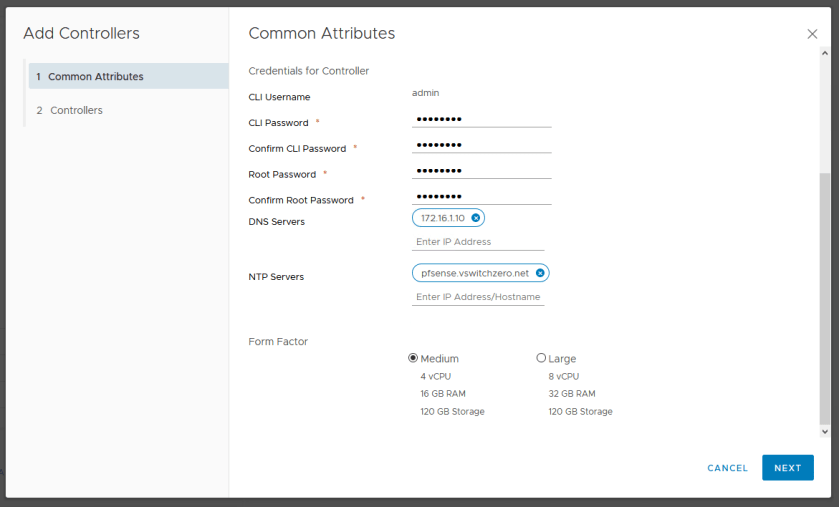
Although automated deployment through vCenter and the UI is convenient, there are some additional benefits to manual controller deployment. Firstly, you can select a non-production ‘small’ sized form factor that isn’t selectable in the UI saving you a couple of vCPUs and about 8GB of RAM per appliance. Secondly, deploying manually also allows you to thin-provision your controller VMDKs off the bat. In a home lab, these are some desirable benefits. And of course, there is always the satisfaction you get from running through the process manually and better understanding what happens behind the scenes.

NSXT-controllerdeploy-2

As seen above, the automated controller deployment wizard does not allow the selection of a ‘Small’ form factor.

Deploying Controllers

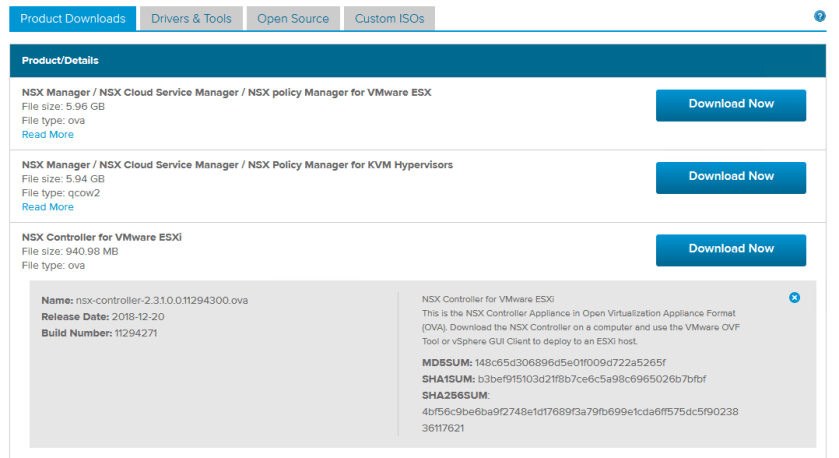
To begin, you’ll need to download the NSX-T controller OVA. You’ll find it listed along with the other NSX-T deliverables on the download page.

NSXT-controllerdeploy-1

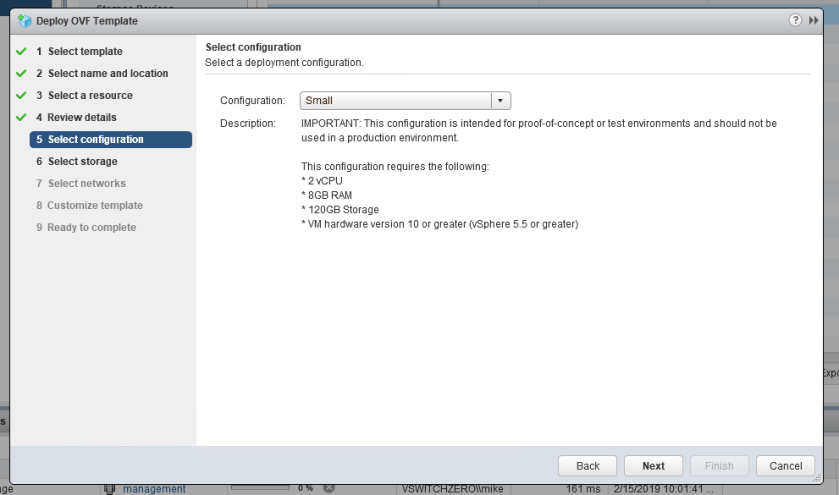
There are a few different ways that you can deploy the OVA including with ovftool. I’m just going to use the vSphere Client for this example. As you can see below, we can now select an unsupported ‘Small’ form-factor deployment:

NSXT-controllerdeploy-3

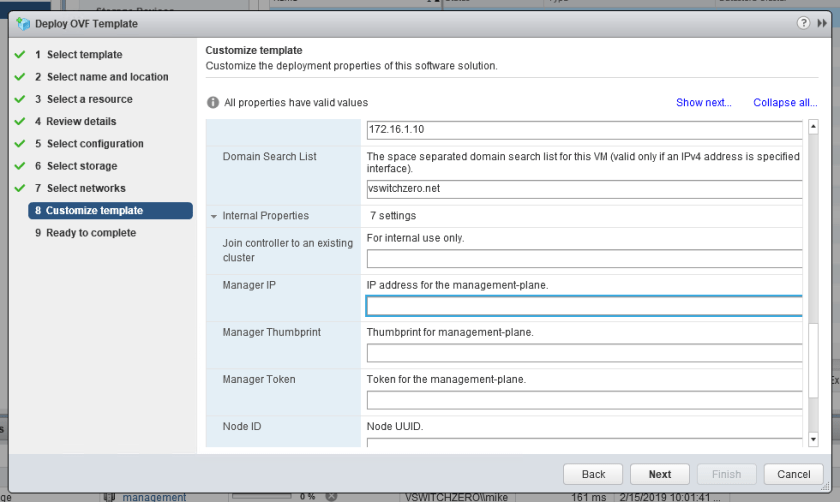
In addition to this, you’ll get the usual template customization options along with a few new ones you may not have seen listed under ‘Internal Properties’:

NSXT-controllerdeploy-4

As you probably have guessed these internal properties can be used to save some of the work needed to get it connected to the management plane and to the control cluster. I’m going to skip this entire section and run through the process manually from the CLI post-deployment.

Continue reading “Deploying NSX-T Controllers Manually”

NSX Troubleshooting Scenario 10

Welcome to the tenth installment of my NSX troubleshooting series – a milestone number for the one-year anniversary of vswitchzero.com. I wasn’t sure how many of these I’d write, but I’ve gotten lots of positive feedback so if I can keep thinking of scenarios, I’ll keep going!

What I hope to do in these posts is share some of the common issues I run across from day to day. Each scenario will be a two-part post. The first will be an outline of the symptoms and problem statement along with bits of information from the environment. The second will be the solution, including the troubleshooting and investigation I did to get there.

I’ll try to include some questions as well for educational purposes in each post.

The Scenario

As always, we’ll start with a brief problem statement:

“I’m using an ESG load balancer to send syslog traffic to a pool of two Linux servers. I can only seem to get UDP syslog traffic to arrive at the pool members. TCP based syslog traffic doesn’t work. I’m using a one-armed load balancer. If I do a packet capture, all I see is the UDP traffic but it’s not coming from the load balancer”

Using the NSX load balancer services for syslog purposes is not at all uncommon. We see this frequently with products like Splunk as well as others. Since syslog traffic can be very heavy, this is a good use case.

When it comes to troubleshooting NSX load balancer issues, triple checking the configuration is key. In speaking with the customer, this is his desired outcome:

  • One-armed load balancer in VLAN 15.
  • No routing done by the edge. Default gateway configuration only and a single interface for simplicity.
  • Transparency is not required – the source IP can be the load balancer as the required source information is in the syslog data transmitted.
  • A mix of both TCP and UDP port 514 traffic is to be load balanced.

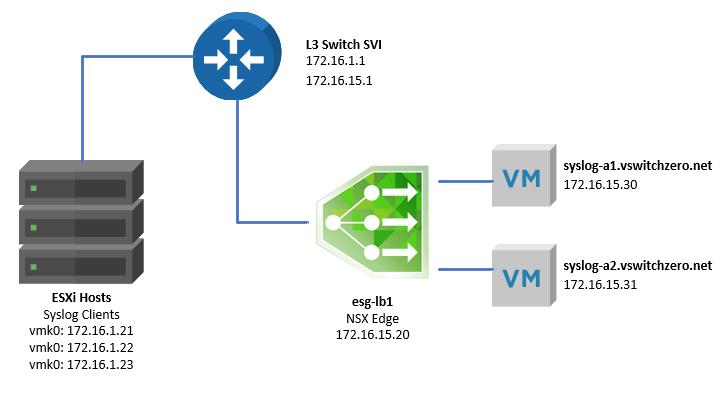
Here is a basic, high-level topology provided by the customer:

tshoot10a-1

The one armed load balancer called esg-lb1 is sitting in VLAN 15. It’s default gateway is the SVI interface of the physical switch (172.16.15.1). There is only one hop between the ESXi hosts – the syslog clients – and the ESG in VLAN 15. Because this is a one-armed topology, the syslog-a1 and syslog-a2 servers are using the same switch SVI as their default gateway.

Continue reading “NSX Troubleshooting Scenario 10”