NSX Troubleshooting Scenario 11

Welcome to the eleventh installment of my NSX troubleshooting series. What I hope to do in these posts is share some of the common issues I run across from day to day. Each scenario will be a two-part post. The first will be an outline of the symptoms and problem statement along with bits of information from the environment. The second will be the solution, including the troubleshooting and investigation I did to get there.

The Scenario

As always, we’ll start with a brief problem statement:

“One of my ESXi hosts has a hardware problem. Ever since putting it into maintenance mode, I’m getting edge high availability alarms in the NSX dashboard. I think this may be a false alarm, because the two appliances are in the correct active and standby roles and not in split-brain. Why is this happening?”

A good question. This customer is using NSX 6.4.0, so the new HTML5 dashboard is what they are referring to here. Let’s see the dashboard alarms first hand.
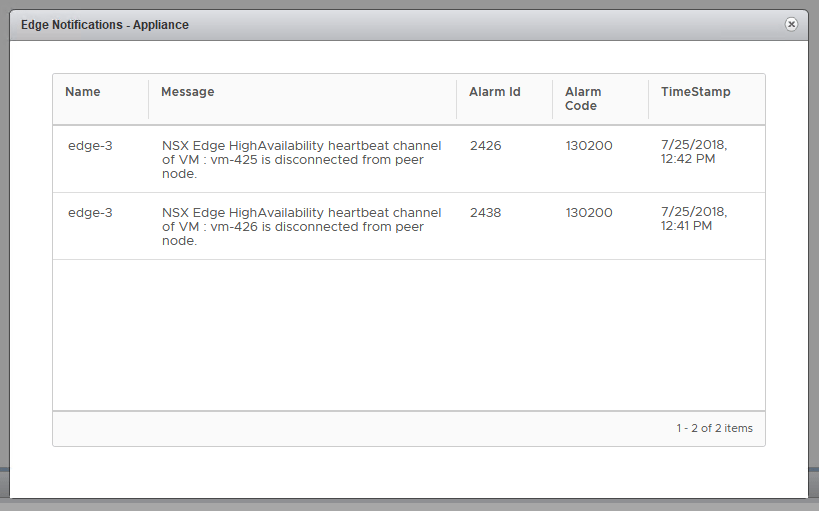
tshoot11a-1

This is alarm code 130200, which indicates a failed HA heartbeat channel. This simply means that the two ESGs can’t talk to each other on the HA interface that was specified. Let’s have a look at edge-3, which is the ESG in question.

Continue reading “NSX Troubleshooting Scenario 11”

Using the Upgrade Coordinator in NSX 6.4

If you’ve ever gone through an NSX upgrade, you know how many components there are to upgrade. You’ve got your NSX manager appliances, control cluster, ESXi host VIBs, edges, DLR and even guest introspection appliances. In the past, every one of these needed to be upgraded independently and in the correct order.

VMware hopes to make this process a lot more straight forward with the release of the new ‘Upgrade Coordinator’ feature. This is now included as of 6.4.0 in the HTML5 client.
The aim of the upgrade coordinator is to create an upgrade plan or checklist and then to execute this in the correct order. There are many aspects of the upgrade plan than can be customized but for those looking for maximum automation – a single click upgrade option exists as well.

It is important to note that although the upgrade coordinator helps to take some of the guess work out of upgrading, there are still tasks and planning you’ll want to do ahead of time. If you haven’t already, please read my Ten Tips for a Successful NSX Upgrade post.

Today I’ll be using the upgrade coordinator to go from 6.3.3 to 6.4.0 and walk you through the process.

Upgrading NSX Manager

Although the upgrade coordinator plan covers numerous NSX components, NSX manager is not one of them. You’ll still need to use the good old manager UI upgrade process as described on page 36 of the NSX 6.4 upgrade guide. Thankfully, this is the easiest part of the upgrade.

You’ll also notice that I can use the upgrade coordinator for my lab upgrade even though I’m at a 6.3.x release currently. This is because the NSX manager is upgraded first, adding this management plane functionality to be used for the rest of the upgrade.

Note: If you are using a Cross-vCenter deployment of NSX, be sure to upgrade your primary, followed by all secondary managers before proceeding with the rest of the upgrade.

upgco-1

Upgrading NSX Manager to 6.4.x should look very familiar as the process really hasn’t changed. Be sure to heed the warning banner about taking a backup before proceeding. For more info on this, please see my Ten Tips for a Successful NSX Upgrade post.

Continue reading “Using the Upgrade Coordinator in NSX 6.4”

The 286 Revival

Being a retro PC enthusiast, my eyes are always open for deals on old hardware. A couple of weeks ago I came across an eBay listing for an as-is “Motherboard with ISA slots”. Looking closely at the posted images, I could see that the board was late-80s to early-90s vintage with sockets for individual memory ICs rather than the usual 30-pin SIMMs. Straining my eyes, I could faintly make out the markings on a Siemens brand 12MHz 286 processor. Having never owned a 286, I thought this may make a fun new project.

It was listed as-is because the seller didn’t have the hardware to test it. This is always a risky proposition, but when dealing with AT based systems, chances are that most people genuinely won’t have what’s needed. This is especially true if the seller doesn’t specialize in vintage hardware – which seemed to be the case here.

Continue reading “The 286 Revival”

Console Mouse Not Working in Windows VMs

I recently ran into some problems while deploying a Windows Server 2012 R2 VM in my vSphere 6.5 U2 lab. I’ve come to expect that the console mouse response is going to be terrible until VMware Tools is installed, but for some odd reason I had no mouse control whatsoever. Thinking it may be a quirk of the Web Console, I tried both the Remote Console and the HTML5 client to no avail.

The VM appeared to be healthy and would register keyboard input, but the motion of the mouse cursor was erratic or the cursor would not move at all. Thinking that I just needed to battle on and get Tools installed, I attempted to use the keyboard for this purpose – what a chore. You think it would have been easy, but the installer kept losing focus and falling behind other open windows. Many of the windows keyboard shortcuts I’d normally use were not functioning because they register on my laptop – not in the console. I couldn’t RDP to the VM either because the NIC needed to be configured with a valid IP address.

After doing a bit of research, it appeared that display scaling could cause all sorts of mouse issues – but this didn’t appear to be applicable in my case. That’s when I stumbled upon a communities thread that mentioned adding a USB controller to the VM. Even though my VM was ‘Hardware Version 13’, the USB 2.0 controller isn’t added by default.

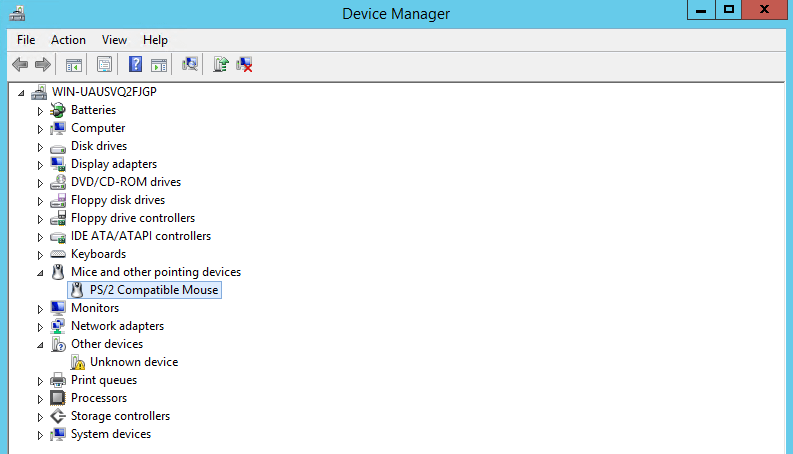
I managed to get to the device manager using the keyboard, and you can see that the virtual hardware will use a PS/2 a mouse in the absence of a USB controller:

consolemouse-2

I then went ahead and added the basic USB 2.0 controller to the VM and booted it up.

Continue reading “Console Mouse Not Working in Windows VMs”

NSX Troubleshooting Scenario 10 – Solution

Welcome to the tenth installment of a new series of NSX troubleshooting scenarios. Thanks to everyone who took the time to comment on the first half of the scenario. Today I’ll be performing some troubleshooting and will show how I came to the solution.

Please see the first half for more detail on the problem symptoms and some scoping.

Getting Started

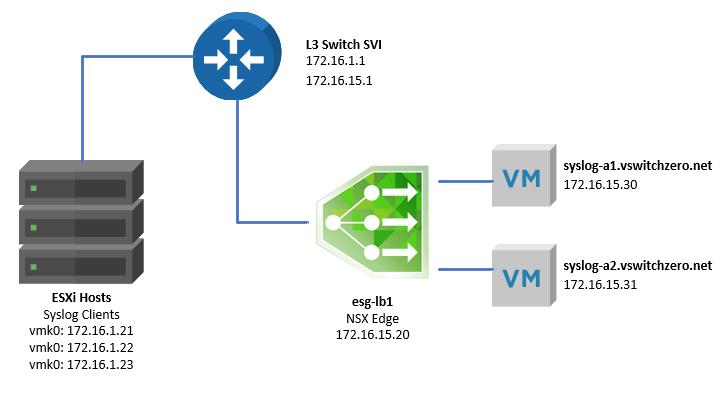
As we saw in the first half, our fictional administrator was attempting to configure an ESG load balancer for both TCP and UDP port 514 traffic. Below is the high-level topology:

tshoot10a-1

One of the first things to keep in mind when troubleshooting the NSX load balancer is the mode in which it’s operating. In this case, we know the customer is using a one-armed load balancer. The tell-tale sign is that the ESG sits in the same VLAN as the pool members with a single interface. Also, the pool members do not have the ESG configured as their default gateway.

We also know based on the screenshots in the first half that the load balancer is not operating in ‘Transparent’ mode – so traffic to the pool members should appear as though it’s coming from the load balancer virtual IP, not from the actual syslog clients. The packet capture the customer did proves that this is actually not the case.

That said, how exactly does an NSX one-armed load balancer work?

As traffic comes in on one of the interfaces and ports configured as a ‘virtual server’, the load balancer will simply forward the traffic to one of the pool members based on the load balancing algorithm configured. In our case, it’s a simple ‘round robin’ rotation of the pool members per session/socket. But forwarding would imply that the syslog servers would see traffic coming from the originating source IP of the syslog client. This would cause a fundamental problem with asymmetry when the pool member needs to reply. When it does, the traffic would bypass the ESG and be sent directly back to the client. This would be fine with UDP, which is connection-less, but what about TCP?

Continue reading “NSX Troubleshooting Scenario 10 – Solution”

One-Year Anniversary of vswitchzero

It’s hard to believe, but a full year has passed since I wrote my first blog post on vswitchzero.com. My first post was something very simple just to get used to the authoring process – suppressing shell warnings – written on June 3rd, 2017.

When I started, my goal was to share my knowledge with the community and to share some of the other things I enjoy as well. I really wasn’t sure if I’d keep up with it or enjoy the process, but it has turned out to be a great personal and professional experience for me. I find myself digging deeper into problems and technologies, and looking for new ways to share, challenge and educate. It’s also been a great outlet for me to share some of my hobbies – like building and restoring retro PCs.

To date, I’ve written 76 posts for an average of about a post and a half per week. When I was getting started, it took some time to get in the swing of releasing regular content. Now, it seems I never have fewer than two or three things on my mind to write about, which is great.

Over the last year, I’ve seen a steady rise in my visitor and view counts and have seen many of my posts work their way up in the google search rankings. Some of them have been surprisingly popular – like my post on VMXNET3 buffer exhaustion and the beacon probing deep dive. I’ve also gotten some really positive feedback on my ongoing NSX Troubleshooting Scenario posts, which I hope to continue with. Being recognized as a 2018 vExpert was also a big milestone for me and I look forward to applying for the 2018 NSX vExpert program as well.

I’d like to take a moment to thank William Lam (@lamw), and Matt Mancini (@vmexplorer) who were a big help in getting me started. They provided me with many great tips. Some of which I have embraced, and others that I still struggle with – like trying not to write 15,000-word posts. They also encouraged me to get on Twitter, which has proven to be an excellent tool to share my posts with the greater community.

Thank you all for your support and encouragement! I look forward to the many posts ahead.

NSX Troubleshooting Scenario 10

Welcome to the tenth installment of my NSX troubleshooting series – a milestone number for the one-year anniversary of vswitchzero.com. I wasn’t sure how many of these I’d write, but I’ve gotten lots of positive feedback so if I can keep thinking of scenarios, I’ll keep going!

What I hope to do in these posts is share some of the common issues I run across from day to day. Each scenario will be a two-part post. The first will be an outline of the symptoms and problem statement along with bits of information from the environment. The second will be the solution, including the troubleshooting and investigation I did to get there.

I’ll try to include some questions as well for educational purposes in each post.

The Scenario

As always, we’ll start with a brief problem statement:

“I’m using an ESG load balancer to send syslog traffic to a pool of two Linux servers. I can only seem to get UDP syslog traffic to arrive at the pool members. TCP based syslog traffic doesn’t work. I’m using a one-armed load balancer. If I do a packet capture, all I see is the UDP traffic but it’s not coming from the load balancer”

Using the NSX load balancer services for syslog purposes is not at all uncommon. We see this frequently with products like Splunk as well as others. Since syslog traffic can be very heavy, this is a good use case.

When it comes to troubleshooting NSX load balancer issues, triple checking the configuration is key. In speaking with the customer, this is his desired outcome:

  • One-armed load balancer in VLAN 15.
  • No routing done by the edge. Default gateway configuration only and a single interface for simplicity.
  • Transparency is not required – the source IP can be the load balancer as the required source information is in the syslog data transmitted.
  • A mix of both TCP and UDP port 514 traffic is to be load balanced.

Here is a basic, high-level topology provided by the customer:

tshoot10a-1

The one armed load balancer called esg-lb1 is sitting in VLAN 15. It’s default gateway is the SVI interface of the physical switch (172.16.15.1). There is only one hop between the ESXi hosts – the syslog clients – and the ESG in VLAN 15. Because this is a one-armed topology, the syslog-a1 and syslog-a2 servers are using the same switch SVI as their default gateway.

Continue reading “NSX Troubleshooting Scenario 10”

Blank Error While Adding NSX DLR or ESG Interfaces

I recently deployed NSX 6.3.2 in my home lab to do some testing. After deploying a DLR, I went back in to add some additional interfaces and was greeted by a ‘blank’ or null error message. Having run into this problem before, I thought it may be a good idea to give some additional context to VMware KB 2151309.

dlrblankerror-1

As you can see above, there is no text associated with the error. There are no problems with the IP or mask I used, and it doesn’t seem clear why this would be failing.

You would expect to find more detail in the NSX Manager vsm.log file, but interestingly there is nothing there at all for this exception. That’s because this isn’t an NSX fault, but rather something in the vSphere Web Client.

Continue reading “Blank Error While Adding NSX DLR or ESG Interfaces”

Certificate Error During Datastore Upload

I have recently rebuilt my home lab – an all too common occurrence due to the number of times I intentionally try to break things. In the process of rebuilding, I had some ISO files I wanted to copy over to a datastore. The process failed and the Web Client greeted me with an uncharacteristically long error message.

dsupload-1

The exact text reads:

“The operation failed for an undetermined reason. Typically, this problem occurs due to certificates that the browser does no trust. If you are using self-signed or custom certificates, open the URL below in a new browser tab and accept the certificate, then retry the operation.”

In my case, the URL that it listed was to one of my ESXi hosts in the compute-a cluster called esx-a2. The error then goes on to reference VMware KB 2147256.

It may seem odd that the vSphere Client would be telling you to visit a random ESXi host’s UI address when you are trying to upload a file via vCenter. But if you stop to think about it for a second, vCenter has no access whatsoever to your datastores. Whether you are trying to create a new VMFS datastore, upload a file or even just browse, vCenter must rely on an ESXi host with the necessary access to do the actual legwork. That ESXi host then relays the information back through the Web Client.

Continue reading “Certificate Error During Datastore Upload”

NSX Troubleshooting Scenario 9 – Solution

Welcome to the ninth installment of a new series of NSX troubleshooting scenarios. Thanks to everyone who took the time to comment on the first half of scenario nine. Today I’ll be performing some troubleshooting and will show how I came to the solution.

Please see the first half for more detail on the problem symptoms and some scoping.

Getting Started

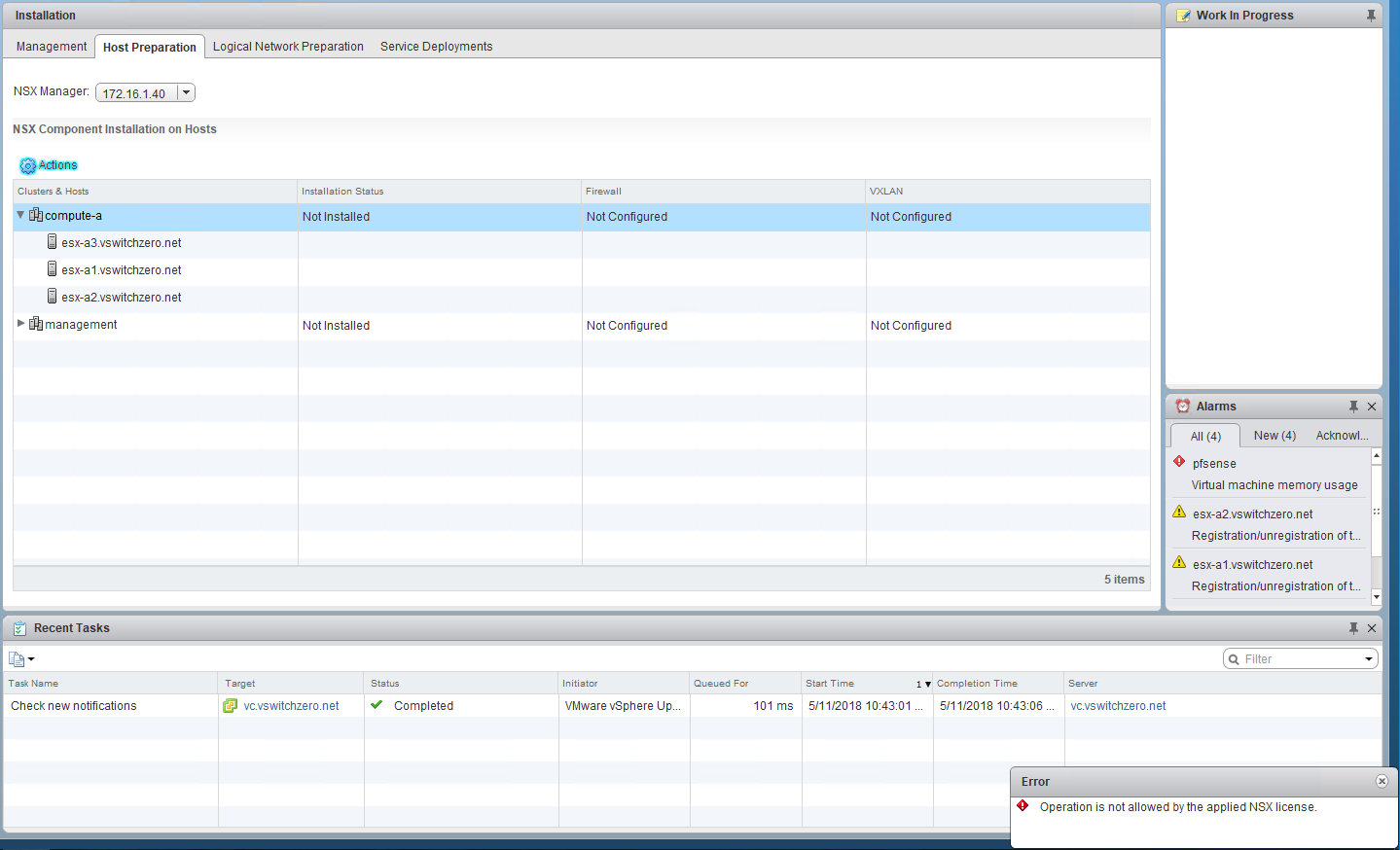
As we saw in the first half, our fictional administrator was unable to install the NSX VIBs on the cluster called compute-a:

tshoot9a-1

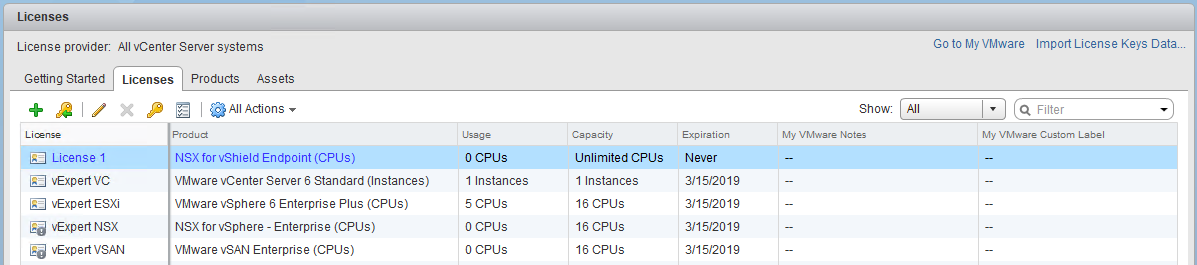
We also saw that there were two different NSX licences added to vCenter. One called ‘Endpoint’ and the other ‘Enterprise’.

tshoot9b-1

You can see that the ‘Usage’ for both licenses is currently “0 CPUs”, but that’s because it hasn’t been installed on any ESXi hosts yet to consume any. What’s most telling, however, is the small little grey exclamation mark on the license icon. If I hover over this, I get a message stating:

“The license is not assigned. To comply with the EULA, assign the license to at least one asset.”

Continue reading “NSX Troubleshooting Scenario 9 – Solution”