NSX Troubleshooting Scenario 2

I got some overwhelmingly positive feedback after posting the first troubleshooting scenario and solution recently. Thanks to everyone who reached out to me via Twitter with feedback and suggestions! Please keep those suggestions and comments coming.

Today, I’m going to post a similar but more brief scenario. This is something that we see regularly in GSS – issues surrounding host preparation!

NSX Troubleshooting Scenario 2

Let’s begin with the usual vague customer problem description:

“We took a host out of the compute-a cluster to do some hardware maintenance. Now it’s been added back and when VMs move to this host, they have no connectivity! We’re using NSX 6.3.2”

This is a fictional scenario of course, but let’s assume that we’ve started taking a look at the environment and collecting some additional data.

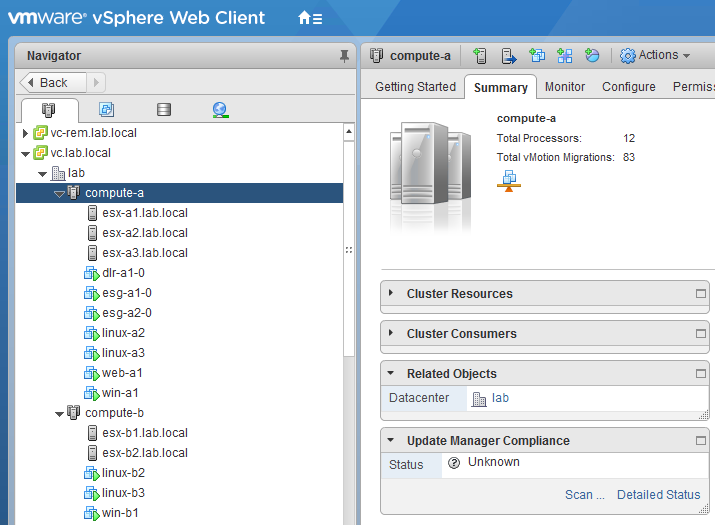
As the customer mentioned, they are running NSX 6.3.2 and have a cluster called compute-a:

tshoot2a-1

The host that was taken out of the cluster for maintenance was esx-a1.lab.local. Similar to the previous scenario, the L3 design is pretty much the same:

Continue reading “NSX Troubleshooting Scenario 2”

NSX Troubleshooting Scenario 1 – Solution

Welcome to the second half of ‘NSX Troubleshooting Scenario 1’ . For detail on the problem and some initial scoping, please see the first part of the scenario that I posted a few days ago. In this half, I’ll walk through some of the troubleshooting I did to find the underlying cause of this problem as well as the solution.

Where to Start?

The scoping done in the previous post gives us a lot of useful information, but it’s not always clear where to start. In my experience, it’s helpful to make educated ‘assertions’ based on what I think the issue is – or more often what I think the issue is not.

I’ll begin by translating the scoping observations into statements:

  • It’s clear that basic L2/L3 connectivity is working to some degree. This isn’t a guarantee that there aren’t other problems, but it looks okay at a glance.
  • We know that win-b1 and web-a1 are both on the same VXLAN logical switch. We also know they are in the same subnet, so that eliminates a lot of the routing as a potential problem. The DLR and ESGs should not really be in the picture here at all.
  • The DFW is enabled, but looks to be configured with the default ‘allow’ rules only. It’s unlikely that this is a DFW problem, but we may need to prove this because the symptoms seem to be specific to HTTP.
  • We also know that VMs in the compute-b cluster are having the same types of symptoms accessing internet based web sites. We know that the infrastructure needed to get to the internet – ESGs, physical routers etc– are all accessed via the compute-a cluster.
  • It was also mentioned by the customer that the compute-b cluster was newly added. This may seem like an insignificant detail, but really increases the likelihood of a configuration or preparation problem.

Based on the testing done so far, the issue appears to be impacting a TCP service – port 80 HTTP. ICMP doesn’t seem impacted. We don’t know if other protocols are seeing similar issues.

Before we start health checking various NSX components, let’s do a bit more scoping to see if we can’t narrow this problem down even further. Right off the bat, the two questions I want answered are:

  1. Are we really talking to the device we expect from a L2 perspective?
  2. Is the problem really limited to the HTTP protocol?

Continue reading “NSX Troubleshooting Scenario 1 – Solution”

NSX Troubleshooting Scenario 1

Welcome to the first of what I hope to be many NSX troubleshooting posts. As someone who has been working in back-line support for many years, troubleshooting is really the bread and butter of what I do every day. Solving problems in vSphere can be challenging enough, but NSX adds another thick layer of complexity to wrap your head around.

I find that there is a lot of NSX documentation out there but most of it is on to how to configure NSX and how it works – not a whole lot on troubleshooting. What I hope to do in these posts is spark some conversation and share some of the common issues I run across from day to day. Each scenario will hopefully be a two-part post. The first will be an outline of the symptoms and problem statement along with bits of information from the environment. The second will be the solution, including the troubleshooting and investigation I did to get there. I hope to leave a gap of a few days between the problem and solution posts to give people some time to comment, ask questions and provide their thoughts on what the problem could be!

NSX Troubleshooting Scenario 1

As always, let’s start with a somewhat vague customer problem description:

“Help! I’ve deployed a new cluster (compute-b) and for some reason I can’t access internal web sites on the compute-a cluster or at any other internet site.”

Of course, this is really only a small description of what the customer believes the problem to be. One of the key tasks for anyone working in support is to scope the problem and put together an accurate problem statement. But before we begin, let’s have a look at the customer’s environment to better understand how the new compute-b cluster fits into the grand scheme of things.

Continue reading “NSX Troubleshooting Scenario 1”

NSX Transport Zone Cluster Removal Issues

Ever remove a cluster from your NSX transport zone only to see it reappear on the list of clusters available for disconnection? Unfortunately, the task likely failed but NSX doesn’t always do a very good job of telling you why in the UI.

I was recently attempting to remove a cluster called compute-b from my transport zone so that I could remove and rebuild the hosts within. Needless to say, I ran into some difficulties and wanted to share my experience.

If you are interested in some more detailed instructions on how to decommission NSX prepared hosts, you can check out my post on Completely Removing NSX. From a high level, the steps I wanted to do were the following:

  1. Disconnect all VMs from logical switches in the cluster to be removed.
  2. Remove the cluster from the transport zone. This will remove all port groups associated with the logical switches (assuming no other clusters are connected to the same distributed switch)
  3. ‘Unconfigure’ VXLAN from the ‘Logical Network Preparation’ tab to remove all VTEPs.
  4. Uninstall the NSX VIBs from the Host Preparation Tab.

To begin, I used the ‘Remove VM’ button from the Logical Switches view in NSX. I removed all four of the VMs attached to the only Logical Switch being used at the moment. I saw a bunch of VM reconfigure tasks complete, and assumed it had completed successfully.

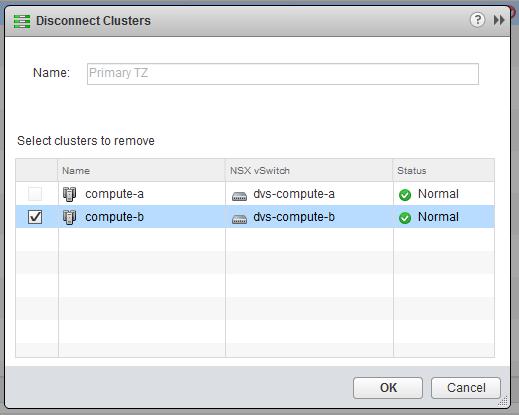
I then went to disconnect compute-b from the transport zone called Primary TZ. After removing the cluster and clicking OK, the dialog closed giving the impression that the task was successful. Oddly though, I didn’t see the tasks related to port group removal that I expected to see.
tzremove-1

Sure enough, I went back into the ‘Disconnect Clusters’ dialog and saw the compute-b cluster still in the list. Unfortunately, NSX doesn’t appear to report failures for this particular workflow in the UI.

Having worked in support for many years, I followed my first instinct and checked the NSX Manager vsm.log file for detail on why the operation failed. I received the below failure details:

2017-11-24 18:50:13.016 GMT+00:00 INFO taskScheduler-8 JobWorker:243 - Updating the status for jobinstance-101742 to EXECUTING
2017-11-24 18:50:13.022 GMT+00:00 INFO taskScheduler-8 SchedulerQueueServiceImpl:64 - [TF] Created a new bucket for module default_module and total number of buckets 1
2017-11-24 18:50:13.022 GMT+00:00 INFO taskScheduler-8 SchedulerQueueServiceImpl:80 - The task ShrinkVdnScope-vdnscope-1 (1511549412299) [id:task-102755] is added to the SchedulerQueue
2017-11-24 18:50:13.022 GMT+00:00 INFO pool-10-thread-1 ScheduleSynchronizer:48 - Start executing task: task-102755 and running executor threads 1
2017-11-24 18:50:13.042 GMT+00:00 INFO TaskFrameworkExecutor-3 VdnScopeServiceImpl$2:995 - New VDS (count: 1) is being removed when shrinking scope vdnscope-1. Shrinkingwires.
2017-11-24 18:50:13.061 GMT+00:00 ERROR TaskFrameworkExecutor-3 VirtualWireServiceImpl:1577 - validation failed at delete backing for dvportgroup-815 in the scope: vdnscope-1
2017-11-24 18:50:13.061 GMT+00:00 ERROR TaskFrameworkExecutor-3 VdnScopeServiceImpl$2:1015 - Shrink operation failed on TZ vdnscope-1
2017-11-24 18:50:13.061 GMT+00:00 ERROR TaskFrameworkExecutor-3 Worker:219 - BaseException thrown while executing task instance taskinstance-166334
com.vmware.vshield.vsm.vdn.exceptions.XvsException: core-services:819:Transport zone vdnscope-1 contraction error.
 at com.vmware.vshield.vsm.vdn.service.VirtualWireServiceImpl.validateShrink(VirtualWireServiceImpl.java:1578)
 at com.vmware.vshield.vsm.vdn.service.VdnScopeServiceImpl$2.doTask(VdnScopeServiceImpl.java:1001)
 at com.vmware.vshield.vsm.vdn.service.task.AbstractVdnRunnableTask.run(AbstractVdnRunnableTask.java:80)
 at com.vmware.vshield.vsm.task.service.Worker.runtask(Worker.java:184)
 at com.vmware.vshield.vsm.task.service.Worker.executeAsync(Worker.java:122)
 at com.vmware.vshield.vsm.task.service.Worker.run(Worker.java:99)
 at java.util.concurrent.ThreadPoolExecutor.runWorker(ThreadPoolExecutor.java:1145)
 at java.util.concurrent.ThreadPoolExecutor$Worker.run(ThreadPoolExecutor.java:615)
 at java.lang.Thread.run(Thread.java:745)
2017-11-24 18:50:13.068 GMT+00:00 INFO TaskFrameworkExecutor-3 JobWorker:243 - Updating the status for jobinstance-101742 to FAILED

There is quite a bit there, but the key takeaways are that the task clearly failed and that the reason was: “validation failed at delete backing for dvportgroup-815 in the scope: vdnscope-1

This doesn’t tell us why exactly, but it seems clear that the operation can’t delete dvportgroup-815 and fails. In my experience, 99% of the time this is because there is still something connected to the portgroup.

Since there were only four VMs in the cluster, and no ESGs or DLRs – I wasn’t sure what could possibly be connected. I even shut down all four disconnected VMs and put all three hosts in maintenance mode just to be sure. None of these actions helped.

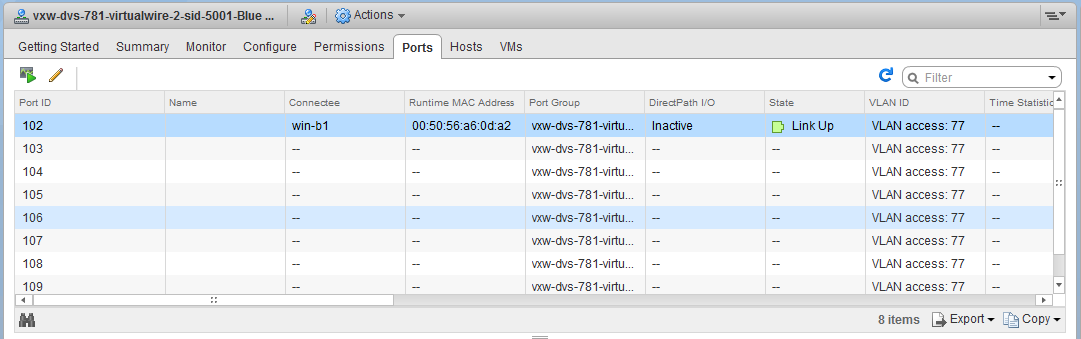
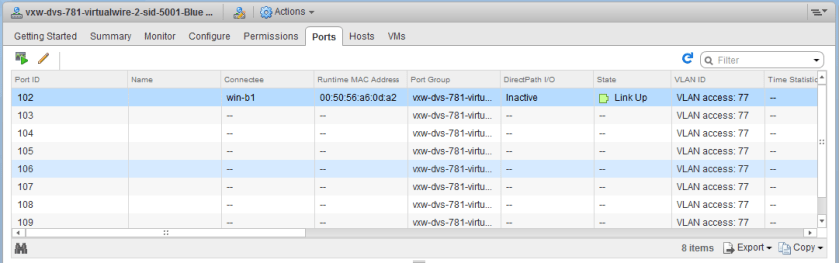
I then navigated to the Networking view in vCenter to have a look at the DVS associated with the compute-b cluster. In the ‘Ports’ view, you can get a good idea of what exactly is still connected to the distributed switch. To my surprise a VM called win-b1 was actually still showing as ‘Active’ and ‘Connected’ to the dvPortgroup associated with a Logical Switch!
tzremove-3

This dvPort state is clearly wrong – first of all, the VM was powered off so it could not be ‘Link Up’. Secondly I thought I had removed the VM. Or did I?
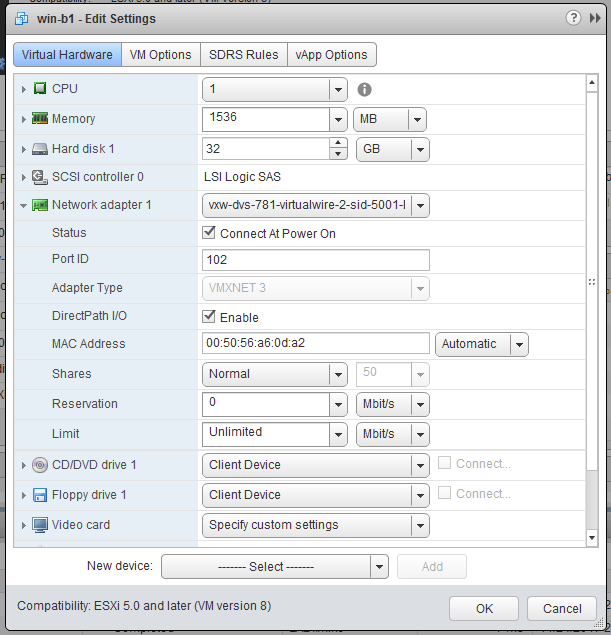
tzremove-4

Although I didn’t see any failures, it doesn’t appear that this VM was removed from the Logical Switch. Maybe I missed it, or perhaps it was a quirk due to the bug outlined in KB 2145889 where DirectPath I/O is enabled on VMs created with the vSphere Web Client. This was the only VM that had this option checked off, but despite my best efforts I could not reproduce the problem. Regardless, knowing what the problem was, I could simply disconnect the NIC and add it to another temporary portgroup.

This adjustment appeared to refresh the DVS port state and then I was able to remove the cluster from the Transport Zone successfully. 

When in doubt, don’t hesitate to dig into the NSX Manager logging. If the UI doesn’t tell you why something didn’t work or is light on details, the logging can often set you in the right direction!

Building a Retro Gaming Rig – Part 5

In Part 4 of this series, I took a look at some sound card options. I’m now getting a lot closer to having this build finished, but there is still one key piece missing – storage.

When dealing with old hardware, hard drives simply don’t age well. Anything with moving parts is prone to failure and degradation over time. Not only this, but as the bearings wear down, the drives begin to have an annoying whine and droning noise that can be heard rooms away.

I’m all for the genuine nostalgic experience, but slow and noisy drives with 20 years of wear behind them are not something I’m particularly interested in. That said, I knew that I wanted to retrofit a modern storage solution to work with this machine.

Challenges and Limitations

Having worked with older hardware before, I was prepared for some challenges along the way. There are numerous drive size limitations and other BIOS quirks that I’d need to navigate around. Below are just a few:

  • Most 486 and older systems are limited to a 504MB hard drive due to a limit of 1024 cylinders being supported in the BIOS.
  • Many systems in the late nineties simply didn’t support drives larger than 32GB due to other BIOS limitations.
  • With a newer BIOS, some IDE systems can support drives as large as 128GB, which was the LBA limit with an ATA interface.

Clearly there are newer IDE drives with capacities beyond 128GB, but these drives require newer Ultra ATA 100/133 controllers. After doing some testing, I discovered that the Asus P2B that I outlined in Part 1 of this series had a 32GB drive limitation with the latest production BIOS and a 128GB limitation with the newest beta BIOS. The MSI MS-6160 that I covered in Part 3 was limited to 32GB. Since this was the board I wanted to use, I could only consider IDE solutions of 32GB or less if I wanted to stick with the onboard controller.

Continue reading “Building a Retro Gaming Rig – Part 5”

VUM Challenges During vCenter 6.5 Upgrade

After procrastinating for a while, I finally started the upgrade process in my home lab to go from vSphere 6.0 to 6.5. The PSC upgrade was smooth, but I hit a roadblock when I started the upgrade process on the vCenter Server appliance.

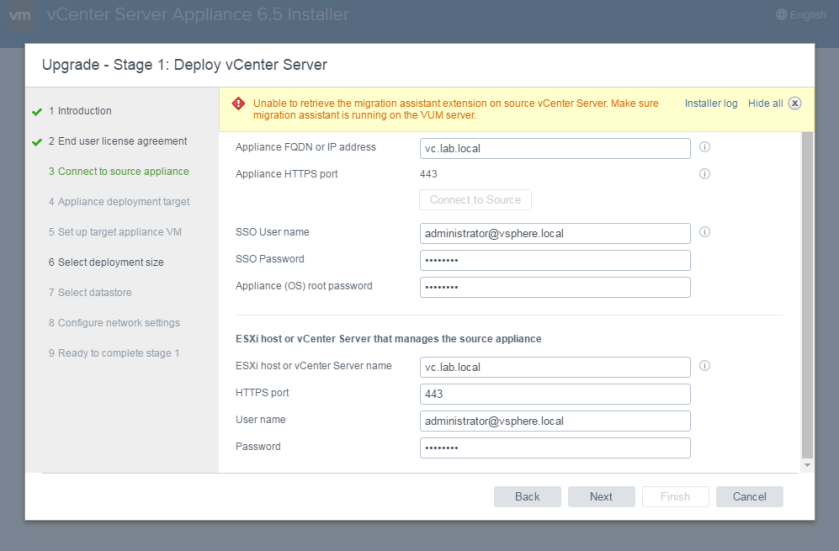
After going through some of the first steps in the process, I ran into the following error when trying to connect to the source appliance.

vumupgrade-1

The exact text of the error reads:

“Unable to retrieve the migration assistant extension on source vCenter Server. Make sure migration assistant is running on the VUM server.”

I had forgotten that I even had Update Manager deployed. Because my lab is small, I generally applied updates manually to my hosts via the CLI. What I do remember, however, is being frustrated that I had to deploy a full-scale Windows VM to run the Update Manager service.

Continue reading “VUM Challenges During vCenter 6.5 Upgrade”

Building a Retro Gaming Rig – Part 4

Welcome to part 4 of my Building a Retro Gaming Rig series. Today I’ll be looking at some sound cards for the build.

Back in the early nineties when I first started taking an interest in PC gaming, most entry-level systems didn’t come with a proper sound card. I still remember playing the original Wolfenstein 3D using the integrated PC speaker on my friend’s 386 system. All of the beeps, boops and tones that speaker could produce still feel somewhat nostalgic to me. We had a lot of fun with games of that era so didn’t really think much about it. It wasn’t until 1994 that I got my first 486 system and a proper Sound Blaster 16. It was then that I really realized what I was missing out on. Despite having really crappy non-amplified speakers, the FM synthesized MIDI music and sound effects were just so awesome. And who can forget messing around with ‘Sound Recorder’ or playing CD audio in Windows 3.11!

With all that in mind, it was clear that I needed a proper sound card for my retro build. But that really isn’t just a ‘checkbox’ to tick – on machines of this era there really was quite a difference between cards and to get the proper vintage experience I’d have to choose correctly.

Continue reading “Building a Retro Gaming Rig – Part 4”

Debunking the VM Link Speed Myth!

10Gbps from a 10Mbps NIC? Why not? Debunking the VM link speed myth once and for all!

** Edit on 11/6/2017: I hadn’t noticed before I wrote this post, but Raphael Schitz (@hypervisor_fr) beat me to the debunking! Please check out his great post on the subject as well here. **

I have been working with vSphere and VI for a long time now, and have spent the last six and a half years at VMware in the support organization. As you can imagine, I’ve encountered a great number of misconceptions from our customers but one that continually comes up is around VM virtual NIC link speed.

Every so often, I’ll hear statements like “I need 10Gbps networking from this VM, so I have no choice but to use the VMXNET3 adapter”, “I reduced the NIC link speed to throttle network traffic” and even “No wonder my VM is acting up, it’s got a 10Mbps vNIC!”

I think that VMware did a pretty good job documenting the role varying vNIC types and link speed had back in the VI 3.x and vSphere 4.0 era – back when virtualization was still a new concept to many. Today, I don’t think it’s discussed very much. People generally use the VMXNET3 adapter, see that it connects at 10Gbps and never look back. Not that the simplicity is a bad thing, but I think it’s valuable to understand how virtual networking functions in the background.

Today, I hope to debunk the VM link speed myth once and for all. Not with quoted statements from documentation, but through actual performance testing.

Continue reading “Debunking the VM Link Speed Myth!”

Boosting vSphere Web Client Performance in ‘Tiny’ Deployments

Getting service health alarms and poor Web Client performance in ‘Tiny’ size deployments? A little extra memory can go a long way if allocated correctly!

In my home lab, I’ve been pretty happy with the vCenter Server ‘Tiny’ appliance deployment size. For the most part, vSphere Web Client performance has been decent and the appliance doesn’t need a lot of RAM or vCPUs.

When I most recently upgraded my lab, I considered using a ‘Small’ deployment but really didn’t want to tie up 16GB of memory – especially with only a small handful of hosts and many services offloaded to an external PSC

Although things worked well for the most part, I had recently been getting vCenter alarms and would get occasional periods of slow refreshes and other oddities.

vsphereclientmem-1
One of two alarms triggering frequently in my lab environment.

The two specific alarms were service health status alarms with the following text strings associated:

The vmware-dataservice-sca status changed from green to yellow

I’d also see this accompanied by a similar message referring to the vSphere Web Client:

The vsphere-client status changed from green to yellow

After doing some searching online, I quickly found VMware KB 2144950 on the subject. Although the cause of this seems pretty clear – insufficient memory allocation to the vsphere-client service – the workaround steps outlined in the KB are lacking context and could use some elaboration.

Continue reading “Boosting vSphere Web Client Performance in ‘Tiny’ Deployments”

Building a Retro Gaming Rig – Part 3

Welcome to the third installment of my Building a Retro Gaming Rig series. Today, I’ll be taking a look at another motherboard and CPU combo that I picked up from eBay on a bit of a whim.

In Part 1 of this series, I took an in-depth look at some Slot-1 gear, including the popular Asus P2B and some CPU options. As I was thinking ahead in the build, I got frustrated with the lack of simple and classic-looking ATX tower cases available these days. Everything looks far too modern, has too much bling or is just plain gigantic. Used tower cases from twenty years ago are all yellowed pretty badly and just look bad. On the other hand, there are lots of small, simple and affordable micro ATX cases available.

Micro ATX – or mATX – motherboards were actually pretty uncommon twenty-odd years ago. PC tower cases were pretty large and in those days people really did use lots of expansion cards and needed the extra space. Only very compact systems and OEMs seemed to use the mATX form factor at that time. Many of these boards were heavily integrated, lacked expansion slots and stuck you with some pretty weak onboard video solutions.

MSI MS-6160 Motherboard

In an interesting twist, I came across an MSI MS-6160 mATX board based on the Intel 440LX chipset that seemed to tick many of the right boxes. The combo included a Celeron 400MHz processor and 512MB of SDRAM for only $35 CDN.

Continue reading “Building a Retro Gaming Rig – Part 3”